Google One

1B+
Installs
Google LLC
Developer
-
Productivity
Category
-
Everyone
Content Rating
-
http://www.google.com/policies/privacy
Privacy Policy
editor reviews
In the ever-expanding digital universe, our need for reliable, secure, and integrated cloud storage has become as essential as the devices we use. Enter Google One, Google's comprehensive subscription service that elegantly bundles and expands upon the familiar foundation of Google Drive. More than just extra gigabytes in the cloud, Google One represents a strategic evolution, transforming basic storage into a holistic suite of tools designed to manage, protect, and enhance your entire Google ecosystem experience. From the casual smartphone photographer to the busy professional juggling multiple projects, it offers a centralized hub for digital life. 🚀🔒📁💡🌐🤝🎯✨🛡️📈
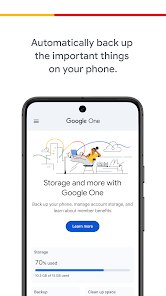
The journey from Google Drive to Google One marked a significant shift in Google's approach. While Drive focused primarily on file storage and synchronization, Google One broadens the horizon by adding premium support, exclusive features, and family sharing under one umbrella. Using the service feels seamless, especially for those already embedded in the Android and Chrome ecosystem. The interface is clean, intuitive, and deeply integrated into Google Photos, Gmail, and Drive itself, making storage management surprisingly straightforward. The automatic backup options for mobile devices provide peace of mind, knowing your precious memories and important documents are safely duplicated without constant manual intervention. 🧩📲🔄🌌🧠💾🤖🎨📂✅
Choosing Google One among a sea of competitors like iCloud, Dropbox, or Microsoft OneDrive often comes down to ecosystem loyalty and added value. If your digital life revolves around Android, Gmail, Google Photos, and Chrome, the integration is unrivaled. The subscription not only provides ample storage but also throws in practical perks like Google Store rewards, VPN access for enhanced online privacy, and direct access to Google experts—a feature that alone can justify the cost for many. It transforms cloud storage from a passive digital closet into an active, supportive partner for your online activities. For anyone seeking a powerful, integrated, and value-packed solution to conquer digital clutter, downloading Google One is the logical next step. 🥇🔐📧🎁📞👨👩👧👦🛒💎⬇️
features
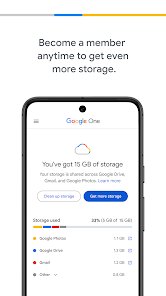
- 🔐 Expanded Secure Storage: At its core, Google One provides significantly more cloud storage space than the free 15GB Google account, with plans ranging from 100GB to a massive 2TB. This space is shared seamlessly across Drive, Gmail, and Google Photos, automatically backing up your phone's photos, videos, and important files in high quality.
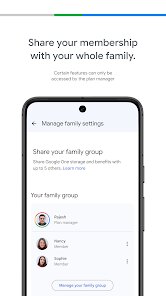
- 👨👩👧👦 Easy Family Sharing: One subscription can be extended to up to five additional family members at no extra cost. Each person gets their own private storage quota, ensuring personal files remain separate while everyone benefits from the expanded pooled storage plan.
- 🛡️ Built-in VPN by Google: Select plans include a VPN (Virtual Private Network) service to encrypt your online traffic on any device. This adds a crucial layer of security, especially when using public Wi-Fi networks, helping to shield your browsing activity from prying eyes.
- 📞 Premium Support Access: Subscribers get priority access to Google's customer support team. You can get real-time help via chat or phone for any Google product issues, from recovering a lost Gmail password to troubleshooting Pixel phone problems, a major upgrade over standard community forums.
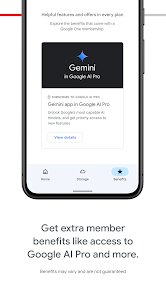
- 🎁 Exclusive Member Benefits: Google frequently offers perks like credits on the Google Store, special discounts on hotels booked through Google, or trials for other services. These benefits add tangible value beyond just storage space.
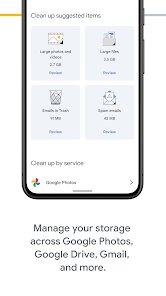
- 🧹 Smart Storage Management: The app includes helpful tools to review and free up space across your account. It can identify large files, blurry photos, or screenshots, making it easy to clean up your digital footprint without jumping between different apps.
pros
- 🌟 Flawless Ecosystem Integration: For users deeply invested in Google's services, the integration is absolutely seamless. Storage automatically applies where you need it most—saving Gmail attachments, backing up Photos, syncing Drive files—creating a unified and hassle-free experience.
- 🤝 Outstanding Value for Families: The family sharing feature is incredibly generous and easy to set up. It effectively reduces the per-person cost of substantial cloud storage to a minimum, making it a budget-friendly solution for households.
- 💎 Beyond-Storage Perks: The inclusion of a VPN, premium support, and store discounts means you're subscribing to a premium service package, not just renting digital space. These extras address common user needs for security, help, and savings.
- 📱 Automatic & Effortless Backup: The mobile app's automatic backup for photos, videos, contacts, and calendar events is set-and-forget magic. It reliably safeguards your mobile data without requiring any ongoing attention or manual uploads.
- 🔧 Proactive Storage Management: The built-in cleanup tools are intuitive and proactive. They don't just show you your storage usage; they offer smart, actionable suggestions to help you manage it effectively, which is a thoughtful touch.
cons
- ⚠️ Limited Appeal Outside Google's World: If you primarily use Apple devices or Microsoft services, the deep integration becomes less relevant. The value proposition diminishes significantly for those not regularly using Drive, Photos, or Gmail as core services.
- 🔄 VPN Limitations: The included VPN, while a nice bonus, is relatively basic compared to dedicated VPN services. It lacks advanced configuration options, specific server location choices, and its availability is restricted to certain subscription tiers only.
- 📊 Potential for Confusion: The transition from "Google Drive storage" to "Google One" can still cause some confusion for long-time users. Understanding what's included in your plan versus what remains a separate Google service requires a bit of a learning curve.
- 💸 Pricing Creep for Higher Tiers: While the entry-level plans are very competitive, the cost for the highest storage tiers (e.g., 2TB and above) can feel steep compared to some pure-play storage competitors who may offer more raw capacity for a similar price.
Articles
![]()
How to Get Robux Safely Without Scams
![]()
How to Download Older Versions of Android Apps
![]()
How to Download Games on Google Play for the First Time
![]()
What Is an APK File for Android? Everything You Need to Know
![]()
Do Free Robux Generators Work?
![]()
Robux Pricing Guide (2026 Update): How Much Robux Really Costs
![]()
How to Avoid Scams in Roblox
![]()
Rarest Pets in Adopt Me! (2026 Update)
![]()
How to Trade Safely in Adopt Me! (So You Don't Lose Everything)
![]()
Secret Tricks Nobody Tells You in 'Steal a Brainrot'
![]()
Beginner Guide: Don't Lose Your Brainrot
![]()
How to Steal in 'Steal a Brainrot' Without Getting Caught (Or at Least Not Instantly)
![]()
Is Brookhaven RP Worth Playing? It Depends on What You’re Looking For
![]()
Why Blox Fruits Is So Popular? Here’s Why Everyone Keeps Playing It
![]()
Best Roblox Obby Games for Beginners (2026): Learn the Game Without Hitting a Wall
![]()
Top 10 Roblox Horror Games (2026): The Scariest Experiences You Can't Miss
















Hot Apps
-
![]()
Passport Parking
Passport Labs, Inc.2.5

-
![]()
Cash App
Block, Inc.4.5 -
![]()
ChatBot - AI Chat
X PhotoKit4.5 -
![]()
ChatGPT
OpenAI4.7 -
![]()
Geeni
Merkury Innovations4.6 -
![]()
YouTube
Google LLC4.1 -
![]()
OfferUp: Buy. Sell. Letgo.
OfferUp Inc.4.4 -
![]()
Venmo
PayPal, Inc.4.2 -
![]()
Sora by OpenAI
OpenAI4.7 -
![]()
GroupMe
GroupMe4.5 -
![]()
TikTok
TikTok Pte. Ltd.4.4 -
![]()
DeepSeek - AI Assistant
DeepSeek4.2 -
![]()
Instagram
Instagram4.3 -
![]()
Microsoft Teams
Microsoft Corporation4.6 -
![]()
Wise: International Transfers
Wise Payments Ltd.4.7 -
![]()
Google Chat
Google LLC4.4 -
![]()
Pinterest
Pinterest4.5 -
![]()
MyFitnessPal: Calorie Counter
MyFitnessPal, Inc.4.3 -
![]()
CapCut - Video Editor
Bytedance Pte. Ltd.4 -
![]()
Amazon Fire TV
Amazon Mobile LLC4.1 -
![]()
Waze Navigation & Live Traffic
Waze3.9 -
![]()
Ford™
Ford Motor Co.4.7 -
![]()
Domino's Pizza USA
Domino's Pizza LLC4.7 -
![]()
Google Home
Google LLC4.2 -
![]()
Signal Private Messenger
Signal Foundation4.5 -
![]()
Telegram
Telegram FZ-LLC4.2 -
![]()
ParkMobile: Park. Pay. Go.
Parkmobile, LLC4.3 -
![]()
Chai: Chat AI Platform
Chai Research Corp.4.4 -
![]()
Ticketmaster-Buy, Sell Tickets
Ticketmaster L.L.C.3 -
![]()
Yuka - Food & cosmetic scan
Yuka App4.7






























Disclaimer
1.Appinfocenter does not represent any developer, nor is it the developer of any App or game.
2.Appinfocenter provide custom reviews of Apps written by our own reviewers, and detailed information of these Apps, such as developer contacts, ratings and screenshots.
3. All trademarks, registered trademarks, brand names and company names or logos appearing on the site are the property of their respective owners.
4.Appinfocenter abides by the federal Digital Millennium Copyright Act (DMCA) by responding to notices of alleged infringement that complies with the DMCA and other applicable laws.
5.If you are the owner or copyright representative and want to delete your information, please contact us [email protected].
6.All the information on this website is strictly observed all the terms and conditions of Google Ads Advertising policies and Google Unwanted Software policy.
7.Appinfocenter.com is an independent, information-only website which is 100% free to all the users.