Canva: AI Photo & Video Editor





500M+
Installs
Canva
Developer
-
Art & Design
Category
-
Everyone 10+
Content Rating
-
https://about.canva.com/privacy-policy/
Privacy Policy
editor reviews
Honestly, I have tried a ridiculous number of design tools over the years, from clunky desktop software that took hours to learn to overly simplistic mobile editors that left me wanting more. When I first stumbled upon Canva, I thought it was just another template mill. I could not have been more wrong. It has genuinely transformed how I approach both personal projects and professional deliverables. This app feels less like a simple editor and more like a complete creative suite that fits in your pocket. The sheer versatility is staggering; one day I am crafting a birthday invitation, and the next I am piecing together a social media campaign for a client, all without ever feeling the need to switch to a laptop. The development team has clearly poured immense effort into ensuring that the mobile experience does not feel like a watered-down version of the web platform. It is a fully realized tool in its own right, with touch controls that are intuitive and responsive. I have found myself reaching for it more than my desktop software because of its sheer immediacy and the fact that it does not sacrifice capability for convenience.
What really cemented Canva as my go-to choice among the sea of similar apps is the flawless integration of AI features. While other editors might offer a single AI tool as a gimmick, Canva has woven artificial intelligence into the very fabric of the creative process. The Magic Studio suite, especially its Magic Edit and Magic Write features, has saved me countless hours that I used to spend on tedious tasks. For instance, I recently had a photo with an awkward background object. Instead of painstakingly cloning it out pixel by pixel, I just brushed over it and typed in 'remove', and it vanished without a trace. The AI photo generation is also incredibly powerful for creating unique visuals that I could never find on stock photo sites. It is not just about quick fixes; it is about unlocking new creative possibilities. This deep integration is the primary reason I chose Canva over competitors like Adobe Express or PicsArt. Those apps are good, but they feel fragmented, with AI bolted on as an afterthought. Canva feels cohesive, where every tool, whether human or AI-driven, is working towards the same goal: making your vision a reality with less friction.
From daily use, I can say that the experience is just plain pleasant. The app loads quickly, the interface is clean without being sterile, and the layout makes sense on a smaller screen. I particularly appreciate the collaborative elements, which allow me to share a design link with a colleague and get their feedback in real-time. It has streamlined our workflow immensely. The extensive library of templates, photos, and icons is a treasure trove, and the search function is finely tuned, helping me find exactly what I need in seconds. Even when I am offline, I can continue to work on drafts and have them sync later, which has saved me during my daily commute. For anyone who has ever felt intimidated by professional design software or frustrated by overly simplistic ones, this app bridges that gap perfectly. If you are a student, a small business owner, a marketer, or just someone who loves crafting beautiful content, you are doing yourself a disservice by not having this app installed. I strongly urge you to head to your app store and download Canva right now; it might just be the last design app you ever need.
features
- ✨ Magic Studio Integration: This is the crown jewel of the app. The AI tools are not separate features but are contextually aware. For example, Magic Grab can select an object from a photo and let you move or resize it, while Magic Expand can extend a background seamlessly. These tools feel proactive, often suggesting edits that you did not even realize you needed, which dramatically speeds up the design process.
- 🎨 Brand Kit Capabilities: For anyone serious about consistency, the Brand Kit allows you to upload your fonts, colors, and logos so they are always one tap away. This is a lifesaver for freelancers who manage multiple clients. Switching from one client's color palette and typography to another is instantaneous, ensuring that every design piece you produce is perfectly on-brand without any guesswork or manual adjustment.
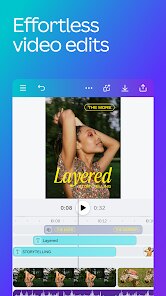
- 📹 Auto-Focused Video Editing: It is not just a still-image editor. The video editor supports multi-track timelines which you can control on your phone. The Beat Sync feature automatically cuts your video clips to match the rhythm of any audio track you add, creating dynamic videos without needing any musical timing skills. This has turned me into a competent short-form video creator for Instagram and TikTok.
- 🗂️ Real-Time Collaboration: Sharing a design link allows team members to leave precise comments or edit directly. The cursor tracking is smooth, showing you exactly what others are working on. This feature replaces a whole host of other communication apps. We no longer send files back and forth through email; we just open the single source of truth within the app and work together, whether my teammate is in the next room or another country.
- 💾 Expansive Content Library: With over a million templates and hundreds of thousands of stock assets, the possibilities are endless. The library is not just vast but also high-quality, with professional photography and unique illustrations. The search filters are incredibly granular, allowing you to filter by orientation, price type, or specific color, which saves you from endlessly scrolling through pages of irrelevant content.
pros
- 🚀 Incredible Workflow Speed: The template pre-setting and AI suggestions cut down design time from hours to minutes. For example, when I create a story post, the app suggests layouts for my specific text and photo count. This proactive assistance significantly reduces the decision fatigue that often accompanies creative work, allowing me to produce more content in a single session than I ever could before.
- 📈 Exceptional Value for Free Users: You get an immense amount of utility even on the free plan, including thousands of templates and tools like background remover, albeit with limited daily uses. It is generous enough that I used it for months without paying a dime, and you can still achieve professional-looking results that would have cost a fortune if you hired a designer.
- 📱 Excellent Cross-Platform Synchronization: I can start a design on my computer at home and meticulously detail it, then open it on my phone while on the bus and add the final touches. The auto-sync is flawless and effortless. The files are always up to date, and I have never experienced a version conflict or lost work due to the transition between devices.
- 🌐 Seamless Social Media Publishing: Once your design is complete, you can directly publish it to all your major social platforms. You do not need to download the file and then open another app to upload it. The integration allows you to tailor captions and hashtags within the Canva interface before hitting the share button, simplifying the final step of the content creation pipeline.
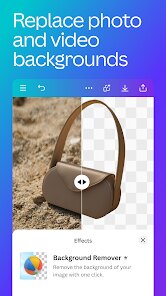
- 🛠️ Advanced Background Removal: This tool is shockingly precise. It handles complex edges, like hair and fur, better than some dedicated standalone apps I have used. There is also a smart cutout feature that allows you to erase and restore parts of the image with a simple brush, giving you manual control that is usually reserved for expensive desktop software.
cons
- 💸 Subscription Promotion Temptation: While the free version is great, Canva often nudges you to try the Pro features. Certain elements are locked behind a Pro paywall, which can be frustrating when you find the perfect photo that you cannot use without subscribing. The pop-ups and banner ads for the paid service can occasionally feel annoying, disrupting your flow.
- 📶 Heavy Reliance on Internet Connection: Although there is offline mode for basic editing, most of the AI features and the vast content library require a strong internet connection. When I am in an area with poor connectivity, the app performance degrades significantly, and many assets are simply inaccessible, rendering the app nearly useless in those situations.
- 🔄 Occasional Editing Tool Glitches: I have experienced rare moments where the app crashes after undoing multiple steps, or when the background remover leaves a white halo around the subject in low-light photos. These are not frequent but they do happen often enough that I always keep an eye on my work and save frequently to avoid losing any progress.
- 📄 Complexity with Large Files: Handling very large PDFs or high-resolution video with multiple layers can cause the app to slow down noticeably. Scrolling through the timeline gets laggy, and applying certain filters can take a few seconds to render, which is a stark contrast to the otherwise snappy performance that the app delivers on smaller projects.
Articles
![]()
How to Get Robux Safely Without Scams
![]()
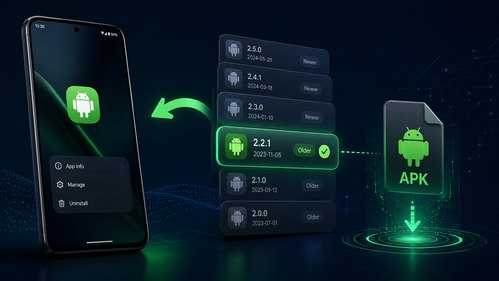
How to Download Older Versions of Android Apps
![]()
How to Download Games on Google Play for the First Time
![]()
What Is an APK File for Android? Everything You Need to Know
![]()
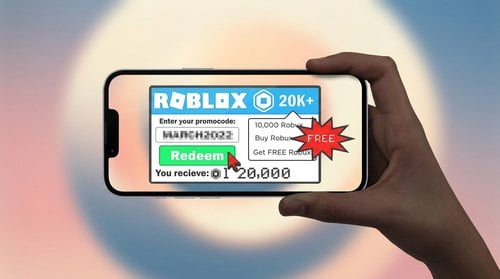
Do Free Robux Generators Work?
![]()
Robux Pricing Guide (2026 Update): How Much Robux Really Costs
![]()
How to Avoid Scams in Roblox
![]()
Rarest Pets in Adopt Me! (2026 Update)
![]()
How to Trade Safely in Adopt Me! (So You Don't Lose Everything)
![]()
Secret Tricks Nobody Tells You in 'Steal a Brainrot'
![]()
Beginner Guide: Don't Lose Your Brainrot
![]()
How to Steal in 'Steal a Brainrot' Without Getting Caught (Or at Least Not Instantly)
![]()
Is Brookhaven RP Worth Playing? It Depends on What You’re Looking For
![]()
Why Blox Fruits Is So Popular? Here’s Why Everyone Keeps Playing It
![]()
Best Roblox Obby Games for Beginners (2026): Learn the Game Without Hitting a Wall
![]()
Top 10 Roblox Horror Games (2026): The Scariest Experiences You Can't Miss










Hot Apps
-
![]()
Google Chat
Google LLC4.4
-
![]()
Grok
xAI4.9
-
![]()
OfferUp: Buy. Sell. Letgo.
OfferUp Inc.4.4 -
![]()
Ford™
Ford Motor Co.4.7 -
![]()
DeepSeek - AI Assistant
DeepSeek4.2 -
![]()
Google Gemini
Google LLC4.6 -
![]()
GasBuddy: Find & Pay for Gas
PDI Software, Inc.3.1 -
![]()
Waze Navigation & Live Traffic
Waze3.9 -
![]()
Wise: International Transfers
Wise Payments Ltd.4.7 -
![]()
Duolingo: Language & Chess
Duolingo4.7 -
![]()
Domino's Pizza USA
Domino's Pizza LLC4.7 -
![]()
Instagram
Instagram4.3 -
![]()
Signal Private Messenger
Signal Foundation4.5 -
![]()
Google Chrome: Fast & Secure
Google LLC4.1 -
![]()
Snapchat
Snap Inc4.1 -
![]()
Passport Parking
Passport Labs, Inc.2.5 -
![]()
Amazon Fire TV
Amazon Mobile LLC4.1 -
![]()
Pandora - Music & Podcasts
Pandora4.1 -
![]()
YouTube
Google LLC4.1 -
![]()
Direct Express®
i2c Inc.4.3 -
![]()
Geeni
Merkury Innovations4.6 -
![]()
ChatOn - AI Chat Bot Assistant
AIBY Inc.4.4 -
![]()
Blink Home Monitor
Immedia Semiconductor4 -
![]()
Google Maps
Google LLC4.2 -
![]()
Netflix
Netflix, Inc.3.9 -
![]()
Telegram
Telegram FZ-LLC4.2 -
![]()
Spotify: Music and Podcasts
Spotify AB4.3 -
![]()
Affirm: Buy now, pay over time
Affirm, Inc4.7 -
![]()
Uber - Request a ride
Uber Technologies, Inc.4.6 -
![]()
ParkMobile: Park. Pay. Go.
Parkmobile, LLC4.3
























Disclaimer
1.Appinfocenter does not represent any developer, nor is it the developer of any App or game.
2.Appinfocenter provide custom reviews of Apps written by our own reviewers, and detailed information of these Apps, such as developer contacts, ratings and screenshots.
3. All trademarks, registered trademarks, brand names and company names or logos appearing on the site are the property of their respective owners.
4.Appinfocenter abides by the federal Digital Millennium Copyright Act (DMCA) by responding to notices of alleged infringement that complies with the DMCA and other applicable laws.
5.If you are the owner or copyright representative and want to delete your information, please contact us [email protected].
6.All the information on this website is strictly observed all the terms and conditions of Google Ads Advertising policies and Google Unwanted Software policy.
7.Appinfocenter.com is an independent, information-only website which is 100% free to all the users.