Doodle Master - Glow Art

10M+
Installs
Hydodo
Developer
-
Art & Design
Category
-
Rated for 3+
Content Rating
-
https://sites.google.com/view/draw-apps-for-free/
Privacy Policy
editor reviews
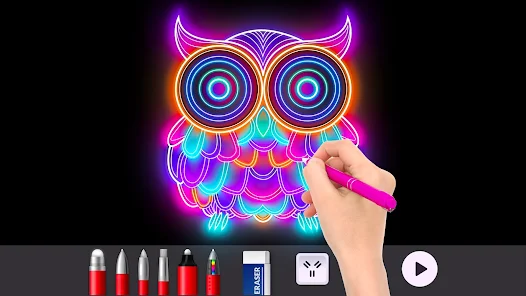
In the bustling world of mobile creativity, where countless apps promise to turn anyone into an artist, Doodle Master - Glow Art carves out a uniquely mesmerizing niche. This app isn't about hyper-realistic painting or complex digital sculpting; it's a portal to a neon dreamscape, a tool for creating luminous, flowing art that feels alive. Developed by Hydodo, it transforms the simple act of drawing into a hypnotic experience of light and color. The core appeal lies in its signature glowing, neon-bright lines that pulse and shimmer against dark backgrounds, creating stunning visual effects with minimal effort. It's less of a traditional drawing application and more of a digital light show at your fingertips, perfect for crafting abstract masterpieces, designing eye-catching social media content, or simply unwinding with a meditative, colorful flow.
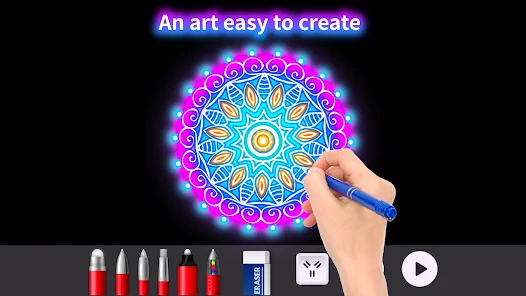
The user experience is intuitively designed for instant gratification. From the moment you open the app, you're greeted with a dark canvas ready to be illuminated. The brush tools are straightforward yet powerful, offering a variety of glowing line styles, from smooth gradients to sparkling particle trails. The color palette is a vibrant spectrum that seems to pop right off the screen. What truly sets Doodle Master apart in a sea of similar glow-drawing apps is its exceptional smoothness and the visceral satisfaction of its drawing engine. The lines follow your finger or stylus with a fluid, lag-free grace, and the glow effects are rendered in real-time with a beautiful intensity. Other apps might offer glow, but few achieve this perfect blend of responsiveness, visual depth, and sheer fun. It feels polished and purposeful, making the creative process effortlessly enjoyable.
Choosing Doodle Master over alternatives comes down to its pure, undiluted focus on the joy of luminous creation. It doesn't clutter the interface with unnecessary professional tools. Instead, it masters one thing beautifully: making you feel like a wizard of light. Whether you're a seasoned digital doodler looking for a new vibe or a complete novice wanting to create something spectacular without a learning curve, this app delivers immediate, dazzling results. The development seems centered on user delight, with regular updates often introducing new brush sets and effects to keep the inspiration fresh. Ready to paint with pure light and lose yourself in a radiant digital canvas? Your next glowing masterpiece is just a download away. Don't wait—tap install and let your creativity shine! ✨🎨📱
features
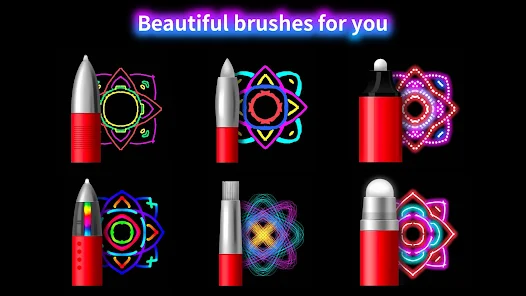
- 🌟 Vibrant Glow Brushes: The heart of the app is its collection of radiant brushes. Each stroke emits a vibrant, neon glow that can be layered to create incredible depth and luminosity. From soft airbrush glows to electric wire-like lines, the variety allows for endless stylistic experimentation.
- 🎨 Dynamic Color Wheel & Palettes: A beautifully implemented color selector offers both a full spectrum wheel and curated palettes. The colors are intensely saturated, ensuring your glowing lines are vivid and eye-catching. You can easily save custom colors for your favorite neon hues.
- ⚡ Real-Time Visual Effects: As you draw, the app applies stunning real-time effects like motion blur, light trails, and sparkles. This transforms simple lines into dynamic, energetic compositions that look like they're moving right on the screen.
- 🖼️ Dark Canvas & Backgrounds: The default dark canvas makes the glowing colors truly pop. The app also provides a library of stylish dark background images (like space, cityscapes, or patterns) to use as a base, adding instant atmosphere to your artwork.
- 🔧 Intuitive Layer System: Manage your composition with a simple yet effective layer system. You can add new layers, adjust their opacity, and rearrange them. This is crucial for building complex glow art without making a messy, uncontrollable light soup.
- 📤 High-Quality Export Options: Once your masterpiece is complete, you can export it in high resolution. The app preserves the intense glow and contrast perfectly, making your creations ready to share on any platform or even use as a unique wallpaper.
- 🌀 Relaxing & Meditative Flow: Beyond creation, the app serves as a fantastic tool for relaxation. The smooth drawing motion combined with the calming effect of blending glowing colors provides a genuinely zen-like, stress-relieving experience.
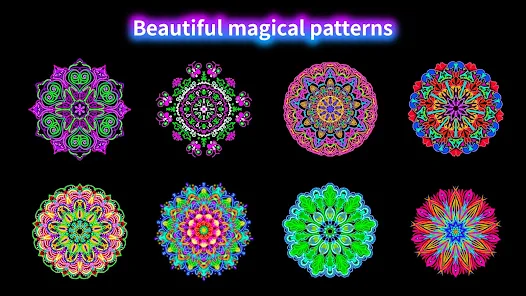
- ✨ Special Effect Stamps & Textures: Enhance your drawings with a fun selection of pre-made glowing stamps (like stars, hearts, or geometric shapes) and overlay textures. These add quick detail and professional flair with a single tap.
- ↩️ Effortless Undo/Redo & Clear: Made a mistake? The undo and redo functions are easily accessible, encouraging fearless experimentation. A single button also clears the entire canvas, letting you start a new light adventure instantly.
- 📖 Zero Learning Curve: The app is designed for immediate play. There are no complicated menus or settings to decipher. You open it, choose a color and brush, and start drawing magic within seconds—democratizing dazzling art creation.
pros
- 😍 Instant Visual Wow Factor: The results are consistently stunning. Even simple, quick doodles look impressive and professional thanks to the powerful glow engine, giving users a huge sense of creative accomplishment.
- 🤩 Butter-Smooth Performance: The drawing experience is exceptionally fluid, with no noticeable lag or jitter. This responsiveness makes detailed work enjoyable and keeps you immersed in the creative flow without technical frustration.
- 🎯 Perfect for All Skill Levels: Its simplicity is its greatest strength. Absolute beginners can create beautiful art immediately, while more experienced users can leverage layers and effects for sophisticated pieces. It truly is an inclusive creative tool.
- 💾 Excellent Sharing Capabilities: The export process is seamless. Your glowing art is saved in your gallery at high quality, ready to be shared directly to social media, messaging apps, or your personal portfolio without losing its luminous impact.
- 🧘 A Genuine Stress Reliever: The act of drawing glowing lines on a dark screen is surprisingly calming and meditative. It's a fantastic digital alternative to mindfulness coloring books, offering a peaceful escape.
- 🆓 Great Free Version: The app offers a robust set of features for free, including several brushes, colors, and backgrounds. This allows users to fully explore the core experience before deciding if they want to unlock even more content.
cons
- 🔒 Premium Features Behind Paywall: To access the full range of brushes, all backgrounds, and the complete color palette, a one-time purchase or subscription is required. The free version, while good, can feel limited after initial exploration.
- 🖌️ Limited Traditional Drawing Tools: If you're looking for pencil sketches, realistic painting, or detailed vector work, this isn't the app. Its laser focus on glow art means it lacks versatility for other artistic styles.
- 📱 Can Be Battery Intensive: Rendering those beautiful, real-time glow effects requires processing power. Extended drawing sessions can lead to noticeable battery drain and potential device warmth, especially on older models.
- ✏️ Lacks Advanced Editing Tools: There are no transform tools (scale, rotate, distort) for individual elements. Once you draw something, you can only undo or erase it, not adjust its position or size independently, which can limit compositional control.
- ☁️ No Cloud Save or Sync: Your artworks are saved locally to your device. There's no built-in cloud backup or sync feature, which poses a risk of losing your creations if something happens to your phone or tablet.
- 📶 Occasional Ad Interruptions: In the free version, full-screen ads can appear at intervals. While understandable for a free app, they can disrupt the immersive, relaxing flow the app otherwise cultivates so well.
Articles
![]()
How to Get Robux Safely Without Scams
![]()
How to Download Older Versions of Android Apps
![]()
How to Download Games on Google Play for the First Time
![]()
What Is an APK File for Android? Everything You Need to Know
![]()
Do Free Robux Generators Work?
![]()
Robux Pricing Guide (2026 Update): How Much Robux Really Costs
![]()
How to Avoid Scams in Roblox
![]()
Rarest Pets in Adopt Me! (2026 Update)
![]()
How to Trade Safely in Adopt Me! (So You Don't Lose Everything)
![]()
Secret Tricks Nobody Tells You in 'Steal a Brainrot'
![]()
Beginner Guide: Don't Lose Your Brainrot
![]()
How to Steal in 'Steal a Brainrot' Without Getting Caught (Or at Least Not Instantly)
![]()
Is Brookhaven RP Worth Playing? It Depends on What You’re Looking For
![]()
Why Blox Fruits Is So Popular? Here’s Why Everyone Keeps Playing It
![]()
Best Roblox Obby Games for Beginners (2026): Learn the Game Without Hitting a Wall
![]()
Top 10 Roblox Horror Games (2026): The Scariest Experiences You Can't Miss
















Hot Apps
-
![]()
Google Chat
Google LLC4.4
-
![]()
Direct Express®
i2c Inc.4.3 -
![]()
OfferUp: Buy. Sell. Letgo.
OfferUp Inc.4.4 -
![]()
Klarna | Shop now. Pay later.
Klarna Bank AB (publ)4.3 -
![]()
Ticketmaster-Buy, Sell Tickets
Ticketmaster L.L.C.3 -
![]()
DeepSeek - AI Assistant
DeepSeek4.2 -
![]()
Google Pay
Google LLC4.4 -
![]()
DoorDash - Food Delivery
DoorDash4.6
-
![]()
Microsoft Teams
Microsoft Corporation4.6 -
![]()
Instagram
Instagram4.3 -
![]()
Afterpay - Buy Now Pay Later
Afterpay3.8 -
![]()
Zoom - One Platform to Connect
zoom.us4.1 -
![]()
Cash App
Block, Inc.4.5 -
![]()
Affirm: Buy now, pay over time
Affirm, Inc4.7 -
![]()
ChatGPT
OpenAI4.7 -
![]()
Facebook
Meta Platforms, Inc.4 -
![]()
Uber - Request a ride
Uber Technologies, Inc.4.6 -
![]()
Yuka - Food & cosmetic scan
Yuka App4.7 -
![]()
Google Chrome: Fast & Secure
Google LLC4.1 -
![]()
TikTok
TikTok Pte. Ltd.4.4 -
![]()
Pinterest
Pinterest4.5 -
![]()
Spotify: Music and Podcasts
Spotify AB4.3 -
![]()
Uber Eats: Food Delivery
Uber Technologies, Inc.4.3 -
![]()
Snapchat
Snap Inc4.1 -
![]()
Google Home
Google LLC4.2 -
![]()
Netflix
Netflix, Inc.3.9 -
![]()
Bolt: Request a Ride
Bolt Technology4.8 -
![]()
YouTube
Google LLC4.1 -
![]()
Google Gemini
Google LLC4.6 -
![]()
Telegram
Telegram FZ-LLC4.2






























Disclaimer
1.Appinfocenter does not represent any developer, nor is it the developer of any App or game.
2.Appinfocenter provide custom reviews of Apps written by our own reviewers, and detailed information of these Apps, such as developer contacts, ratings and screenshots.
3. All trademarks, registered trademarks, brand names and company names or logos appearing on the site are the property of their respective owners.
4.Appinfocenter abides by the federal Digital Millennium Copyright Act (DMCA) by responding to notices of alleged infringement that complies with the DMCA and other applicable laws.
5.If you are the owner or copyright representative and want to delete your information, please contact us [email protected].
6.All the information on this website is strictly observed all the terms and conditions of Google Ads Advertising policies and Google Unwanted Software policy.
7.Appinfocenter.com is an independent, information-only website which is 100% free to all the users.