Tesla

5M+
Installs
Tesla, Inc.
Developer
-
Auto & Vehicles
Category
-
Everyone
Content Rating
-
https://www.tesla.com/legal/privacy
Privacy Policy
editor reviews
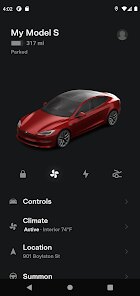
I've spent the last several weeks using the Tesla app to manage my daily interactions with my Model 3, and I can honestly say it's more than just a remote control—it's the central nervous system of the entire ownership experience. 🚗⚡ The app connects seamlessly to your vehicle via cellular data, allowing you to do everything from pre-conditioning the cabin temperature on a scorching summer day to honking the horn when you've forgotten where you parked in a massive lot. 🌡️🔑 One of the standout aspects is how it bridges the gap between your phone and the car, effectively making physical key fobs feel archaic and unnecessary. The user interface is clean, minimalist, and remarkably responsive, which is exactly what you'd expect from a company that built its reputation on flawless industrial design. 🎨📱 Over the years, Tesla has been relentless with software updates—improving everything from summoning your car out of a tight garage spot to integrating third-party streaming services like Netflix and Spotify directly into the vehicle's infotainment system through the app's companion features. 📺🎵 I chose the Tesla app over competitors like FordPass or MyChevrolet because it's not just an add-on; it's the primary way you interact with the vehicle's advanced functions, including software updates, security monitoring, and even purchasing premium upgrades like Acceleration Boost. 💡🛠️
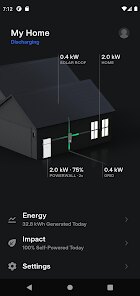
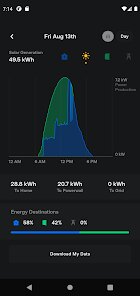
From a usage perspective, the experience is incredibly polished but also deeply tied to the Tesla ecosystem, which has its own learning curve. 🖱️🧩 The app serves as a gateway to features like Dog Mode, which keeps your pet cool while you run errands, and Sentry Mode, which records any suspicious activity around the car through its built-in cameras. 🐕📹 You can also use it to schedule charging sessions to take advantage of lower electricity rates, or even monitor your solar panels and Powerwall if you're fully integrated into Tesla's energy suite. ☀️🔋 The real-time data is impressive—you can see the exact battery percentage, estimated range, and tire pressure without ever stepping outside. 📊🔍 Compared to apps like BMW's My BMW or Audi's myAudi, the Tesla app feels less like a feature checklist and more like a living, breathing part of the car. It updates nearly every week with subtle tweaks that make everyday tasks easier, like adding the ability to remotely open the frunk for a delivery driver. 📦🚪
What really sold me on this app over others is the sheer reliability and speed when connecting to the car. 🚀📡 While other brands often lag with slow commands or constant "connection failed" messages, the Tesla app responds almost instantaneously, whether I'm unlocking the doors from 10 feet away or activating the climate control from 50 miles away. 🏃♂️🔓 The integration with third-party weight-saving tools like watchOS for keyless driving via an Apple Watch is a bonus, but the core experience is so solid that I rarely need to use a physical key. ⌚🔐 In a market flooded with auto apps that feel like afterthoughts, the Tesla app stands out as a primary tool that enhances every part of the ownership journey. If you are considering an electric vehicle and want a digital companion that keeps getting better, this app is a no-brainer—download it right now and experience the future of car control. 📲🌟
features
- 🔑 Phone Key and Vehicle Access: This feature completely revolutionizes how you interact with your car. You simply walk up to the vehicle with your phone in your pocket, and the app uses Bluetooth to automatically unlock the doors as you approach, then lock them when you walk away. No fumbling for keys or tapping your phone—it's seamless and feels like magic every time. 🚪🔓
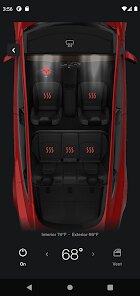
- 🌡️ Climate Preconditioning: The app's power to remotely control the cabin temperature is a game-changer. You can set the heater or air conditioner to your desired temperature before you even get in the car, which is especially useful for scorching summers or freezing winters. It also allows you to defrost the windshield and turn on seat heaters, making every drive comfortable from the moment you sit down. ❄️🔥
- 📹 Sentry Mode and Live Camera View: Security is a huge priority, and this app lets you actively monitor your car. Sentry Mode uses surrounding cameras to record any suspicious activity, and you can even remotely access the live camera feed from your phone to see what's happening around the vehicle in real-time. It's incredibly reassuring to be able to check on your car while at a restaurant or in a parking lot. 👁️🎥
- ⚡ Charging Management and Scheduling: The app provides deep control over your charging habits. You can view the current charge level, set a charge limit to maximize battery longevity, and schedule charging to start and stop at specific times. It also integrates with time-of-use utility rates, allowing you to charge during off-peak hours to save money, plus you can see charging statistics and costs over time. 🔌📆
- 🛠️ Live Software Updates and Vehicle Controls: One of the most remarkable things is how the app manages over-the-air (OTA) updates. You receive notifications when a new software update is available, and you can initiate the installation from the app. Beyond that, you can adjust vehicle controls like opening the frunk, unlocking the charge port, and even honking the horn or flashing the lights to locate the car in a crowded lot. 🔄🔧
pros
- 🌟 Exceptional Integration and Responsiveness: The app feels like a natural extension of the car, not a separate tool. Commands like locking, unlocking, or pre-conditioning the cabin are processed almost immediately, often in under two seconds. This reliability means you never question whether your command went through, which is a huge step up from many auto apps that frequently hang or fail. 🚀📡
- 🔋 Rich Energy and Range Data: The level of detail you get about battery health, energy consumption, and range is fantastic. You can see your driving efficiency in kWH per mile, historical charging graphs, and even the estimated range based on your driving style. This transparency helps you plan long trips and understand exactly how your driving habits impact battery life. 📊🔍
- 🎵 Built-in Entertainment and Customization: The app pairs with the car's infotainment to offer direct access to streaming services like Netflix, YouTube, and Spotify within the vehicle. But the app itself also allows you to customize settings like steering wheel heat, stop mode, and acceleration profiles. It's this level of granular control that makes you feel truly in charge of your car's personality and comfort. 🎬🎶
cons
- ⚠️ Occasional Connection Drops in Remote Areas: While the app is generally rock-solid, it can struggle in areas with poor cellular coverage, like underground parking garages or remote rural locations. During those times, you might find yourself waiting 10-15 seconds for a command to go through, or worse, failing entirely. It's a rare issue but can be frustrating if you're trying to quickly schedule charging before a meeting. 📡😤
- 🔒 Reliance on Tesla's Servers and Connectivity: The app is heavily dependent on both your phone's internet connection and Tesla's cloud servers. If Tesla's backend experiences an outage—which has happened a few times—you can't even unlock the car or see the battery status. This over-reliance on the internet means you're vulnerable to service disruptions, and while there's a key card as a backup, it's less convenient. ☁️🔐
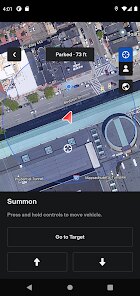
- 💰 Premium Feature Costs Limit Potential: Some of the coolest features, like "Summon" (remotely moving the car), "Smart Summon" (automated self-parking from a distance), or full access to satellite-view maps and traffic, require purchasing the "Full Self-Driving" package or a premium connectivity subscription. This creates a situation where the app's full prowess is locked behind spending hundreds or thousands of dollars in upgrades, making some features feel deliberately paywalled. 💸🚫
Articles
![]()
How to Get Robux Safely Without Scams
![]()
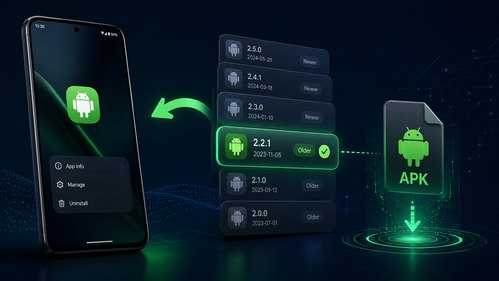
How to Download Older Versions of Android Apps
![]()
How to Download Games on Google Play for the First Time
![]()
What Is an APK File for Android? Everything You Need to Know
![]()
Do Free Robux Generators Work?
![]()
Robux Pricing Guide (2026 Update): How Much Robux Really Costs
![]()
How to Avoid Scams in Roblox
![]()
Rarest Pets in Adopt Me! (2026 Update)
![]()
How to Trade Safely in Adopt Me! (So You Don't Lose Everything)
![]()
Secret Tricks Nobody Tells You in 'Steal a Brainrot'
![]()
Beginner Guide: Don't Lose Your Brainrot
![]()
How to Steal in 'Steal a Brainrot' Without Getting Caught (Or at Least Not Instantly)
![]()
Is Brookhaven RP Worth Playing? It Depends on What You’re Looking For
![]()
Why Blox Fruits Is So Popular? Here’s Why Everyone Keeps Playing It
![]()
Best Roblox Obby Games for Beginners (2026): Learn the Game Without Hitting a Wall
![]()
Top 10 Roblox Horror Games (2026): The Scariest Experiences You Can't Miss









Hot Apps
-
![]()
Geeni
Merkury Innovations4.6

-
![]()
Signal Private Messenger
Signal Foundation4.5 -
![]()
Sora by OpenAI
OpenAI4.7 -
![]()
Uber - Request a ride
Uber Technologies, Inc.4.6 -
![]()
Google Gemini
Google LLC4.6 -
![]()
Hulu: Stream TV shows & movies
Disney4.5 -
![]()
Facebook
Meta Platforms, Inc.4 -
![]()
Klarna | Shop now. Pay later.
Klarna Bank AB (publ)4.3 -
![]()
Spotify: Music and Podcasts
Spotify AB4.3 -
![]()
GasBuddy: Find & Pay for Gas
PDI Software, Inc.3.1 -
![]()
Ticketmaster-Buy, Sell Tickets
Ticketmaster L.L.C.3 -
![]()
MyFitnessPal: Calorie Counter
MyFitnessPal, Inc.4.3 -
![]()
Zoom - One Platform to Connect
zoom.us4.1 -
![]()
Google Pay
Google LLC4.4 -
![]()
YouTube
Google LLC4.1 -
![]()
TikTok
TikTok Pte. Ltd.4.4 -
![]()
ParkMobile: Park. Pay. Go.
Parkmobile, LLC4.3 -
![]()
Pinterest
Pinterest4.5 -
![]()
Snapmint: Buy Now, Pay in EMIs
Snapmint4.5 -
![]()
Pandora - Music & Podcasts
Pandora4.1 -
![]()
Direct Express®
i2c Inc.4.3 -
![]()
Netflix
Netflix, Inc.3.9 -
![]()
ChatBot - AI Chat
X PhotoKit4.5 -
![]()
CapCut - Video Editor
Bytedance Pte. Ltd.4 -
![]()
Passport Parking
Passport Labs, Inc.2.5 -
![]()
letgo: Buy & Sell Used Stuff
letgo3.3 -
![]()
PayByPhone
PayByPhone Technologies Inc .4.9 -
![]()
Google Chrome: Fast & Secure
Google LLC4.1 -
![]()
Yuka - Food & cosmetic scan
Yuka App4.7 -
![]()
Instagram
Instagram4.3





























Disclaimer
1.Appinfocenter does not represent any developer, nor is it the developer of any App or game.
2.Appinfocenter provide custom reviews of Apps written by our own reviewers, and detailed information of these Apps, such as developer contacts, ratings and screenshots.
3. All trademarks, registered trademarks, product names and company names or logos appearing on the site are the property of their respective owners.
4.Appinfocenter abides by the federal Digital Millennium Copyright Act (DMCA) by responding to notices of alleged infringement that complies with the DMCA and other applicable laws.
5.If you are the owner or copyright representative and want to delete your information, please contact us [email protected].
6.All the information on this website is strictly observed all the terms and conditions of Google Ads Advertising policies and Google Unwanted Software policy.
7.Appinfocenter.com is an independent, information-only website which is 100% free to all the users.