Simple Calendar - easy planner

5M+
Installs
Komorebi Inc.
Developer
-
Productivity
Category
-
Everyone
Content Rating
-
https://komorebi-studio.com/policyredirect.html
Privacy Policy
editor reviews
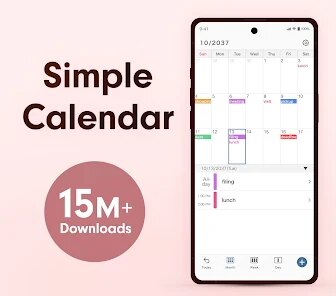
📅 If you're looking for a calendar app that cuts through the noise and focuses on pure functionality, Simple Calendar by Komorebi Inc. is a breath of fresh air. 🍃 Unlike the cluttered interfaces of major competitors like Google Calendar or Fantastical, this app strips everything back to the essentials, offering a clean, distraction-free environment where you can actually manage your time without feeling overwhelmed. 🚀 The development team has clearly prioritized speed and simplicity, resulting in a blazing-fast app that opens instantly and responds to touches without any lag. ⚡ My experience using it daily has been centered around its core philosophy: scheduling should be straightforward. 🎯 There are no AI assistants, no complex project management tools, and no social features trying to sell you something. 💡 It's just a robust, reliable calendar that does exactly what it's supposed to do, which is ultimately the highest compliment you can give a productivity tool. 🏆
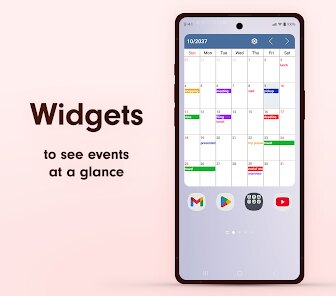
🌟 What truly sets Simple Calendar apart is its laser focus on the user's primary need: organizing events without friction. 🧘 While other apps try to be everything to everyone, this one knows its identity and stays in its lane. 🛣️ I chose it over alternatives because I was tired of fighting with bloated software just to add a doctor's appointment. 🩺 The interface is surprisingly customizable for such a minimal app, allowing you to tweak colors, views, and icons without adding cognitive load. 🎨 The widget is a standout feature, displaying upcoming events on your home screen in a simple, readable format that doesn't eat up your battery or data. 🔋 More importantly, the app remains completely functional offline, which is a godsend for those with limited connectivity or privacy concerns. 🛡️ It syncs reliably with my device's native calendar, ensuring no event is ever missed due to syncing errors. ✨
📲 If you are tired of apps that demand more of your attention than they give back, Simple Calendar is the solution you've been searching for. 🗺️ It respects your time by getting out of your way as soon as the event is saved. ⏳ The learning curve is practically nonexistent, meaning you can start organizing your life within minutes of installation. 🧠 For anyone who values mental clarity and efficient time management over flashy but useless features, this is a no-brainer. 👍 I've personally found it to be an antidote to digital clutter, helping me focus on what actually matters. 💖 Now is the perfect time to simplify your schedule and reclaim your focus. 🎉 Head over to the app store and download Simple Calendar today to experience what a truly well-designed calendar feels like. 🌈 Your future self will thank you for making the switch. 🙌
features
- 🚀 Instant Event Creation: Add new events in under five seconds with a minimal, tap-driven interface that eliminates unnecessary fields for standard appointments.
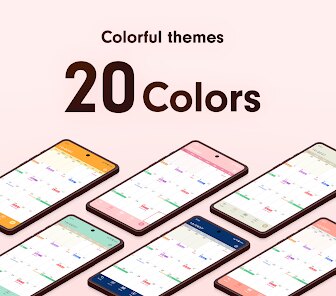
- 🎨 Visual Simplicity: A clean, monochrome-like default theme with soft accent colors prevents visual fatigue, ensuring you can scan your day at a glance without strain.
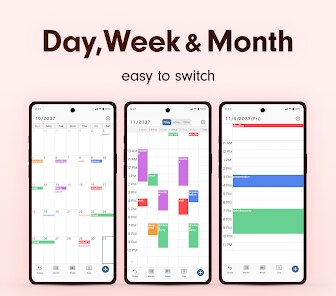
- ⚙️ Flexible Views: Switch seamlessly between daily, weekly, monthly, and agenda views, each optimized for clarity without overcrowding the screen with data.
- 📅 Native Widget: The lock screen and home screen widgets are non-interactive but highly readable, showing only the next few events in a large, legible font.
- 🔒 Offline Reliability: Every feature works fully without an internet connection, making it perfect for travel, remote areas, or users concerned about data privacy.
- 📝 Recurring Event Logic: Setting up repeating events is incredibly intuitive, with options for daily, weekly, monthly, and yearly patterns that actually work as expected.
pros
- 💨 Blazing Performance: The app launches and operates with zero delay, scrolling smoothly even when loaded with years of event data, which is a rare quality among calendar apps.
- 🧘 Distraction-Free Design: There are no ads, no in-app purchases nagging you, and no feature bloat, allowing you to focus solely on your schedule without unnecessary interruptions.
- 🤝 Superb Syncing: It integrates flawlessly with standard OS calendar services like iCloud or Google, providing reliable two-way sync that never duplicates or loses events.
- 🪶 Lightweight Footprint: Taking up minimal storage space and using negligible battery life, it runs quietly in the background without draining your phone's resources.
- 🖌️ Personalization Without Clutter: You can change the accent color and week start day, but there are no overwhelming customization menus that add complexity to the experience.
- 📆 Reliable Reminders: Notifications appear exactly on time, with the ability to set multiple custom alerts per event without any delay or missed prompts.
cons
- 🔔 Limited Notification Options: The app lacks advanced notification types like location-based reminders or smart alerts that learn from your behavior, feeling relatively basic in this area.
- 🗂️ No Integrated Tasks: Unlike many modern calendar apps, there is no to-do list or task management feature built in, forcing you to use a separate app for checklists.
- 🎤 No Natural Language Input: You cannot type "Lunch with Sarah tomorrow at noon" and have it automatically parsed, requiring manual entry for every event detail including time.
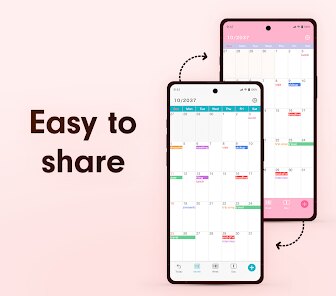
- 🌐 Basic Sharing Capabilities: Sharing an event with others or publishing a public calendar link is either unavailable or cumbersome, limiting collaborative use cases.
- 📁 Import/Export Limitations: While it handles basic .ics files, importing from other major platforms or exporting large amounts of data can feel clunky and incomplete.
- 📊 Lack of Analytics: There are no insights or statistics about how you spend your time, which is a missed opportunity for users who want to analyze their schedule patterns.
Articles
![]()
How to Get Robux Safely Without Scams
![]()
How to Download Older Versions of Android Apps
![]()
How to Download Games on Google Play for the First Time
![]()
What Is an APK File for Android? Everything You Need to Know
![]()
Do Free Robux Generators Work?
![]()
Robux Pricing Guide (2026 Update): How Much Robux Really Costs
![]()
How to Avoid Scams in Roblox
![]()
Rarest Pets in Adopt Me! (2026 Update)
![]()
How to Trade Safely in Adopt Me! (So You Don't Lose Everything)
![]()
Secret Tricks Nobody Tells You in 'Steal a Brainrot'
![]()
Beginner Guide: Don't Lose Your Brainrot
![]()
How to Steal in 'Steal a Brainrot' Without Getting Caught (Or at Least Not Instantly)
![]()
Is Brookhaven RP Worth Playing? It Depends on What You’re Looking For
![]()
Why Blox Fruits Is So Popular? Here’s Why Everyone Keeps Playing It
![]()
Best Roblox Obby Games for Beginners (2026): Learn the Game Without Hitting a Wall
![]()
Top 10 Roblox Horror Games (2026): The Scariest Experiences You Can't Miss










Hot Apps
-
![]()
PayByPhone
PayByPhone Technologies Inc .4.9

-
![]()
Blink Home Monitor
Immedia Semiconductor4 -
![]()
Pandora - Music & Podcasts
Pandora4.1 -
![]()
Hulu: Stream TV shows & movies
Disney4.5 -
![]()
Google Maps
Google LLC4.2 -
![]()
WhatsApp Messenger
WhatsApp LLC4.2 -
![]()
Grok
xAI4.9 -
![]()
Microsoft Teams
Microsoft Corporation4.6 -
![]()
Spotify: Music and Podcasts
Spotify AB4.3 -
![]()
ParkMobile: Park. Pay. Go.
Parkmobile, LLC4.3 -
![]()
Ticketmaster-Buy, Sell Tickets
Ticketmaster L.L.C.3 -
![]()
GroupMe
GroupMe4.5 -
![]()
Instagram
Instagram4.3 -
![]()
TikTok
TikTok Pte. Ltd.4.4 -
![]()
GasBuddy: Find & Pay for Gas
PDI Software, Inc.3.1 -
![]()
ChatGPT
OpenAI4.7 -
![]()
Google Pay
Google LLC4.4 -
![]()
PayPal - Send, Shop, Manage
PayPal Mobile4.3 -
![]()
ChatBot - AI Chat
X PhotoKit4.5 -
![]()
Passport Parking
Passport Labs, Inc.2.5 -
![]()
Ford™
Ford Motor Co.4.7 -
![]()
OfferUp: Buy. Sell. Letgo.
OfferUp Inc.4.4 -
![]()
YouTube
Google LLC4.1 -
![]()
Pinterest
Pinterest4.5 -
![]()
Klarna | Shop now. Pay later.
Klarna Bank AB (publ)4.3 -
![]()
Duolingo: Language & Chess
Duolingo4.7 -
![]()
Facebook
Meta Platforms, Inc.4 -
![]()
Google Chrome: Fast & Secure
Google LLC4.1 -
![]()
Geeni
Merkury Innovations4.6 -
![]()
letgo: Buy & Sell Used Stuff
letgo3.3


























Disclaimer
1.Appinfocenter does not represent any developer, nor is it the developer of any App or game.
2.Appinfocenter provide custom reviews of Apps written by our own reviewers, and detailed information of these Apps, such as developer contacts, ratings and screenshots.
3. All trademarks, registered trademarks, brand names and company names or logos appearing on the site are the property of their respective owners.
4.Appinfocenter abides by the federal Digital Millennium Copyright Act (DMCA) by responding to notices of alleged infringement that complies with the DMCA and other applicable laws.
5.If you are the owner or copyright representative and want to delete your information, please contact us [email protected].
6.All the information on this website is strictly observed all the terms and conditions of Google Ads Advertising policies and Google Unwanted Software policy.
7.Appinfocenter.com is an independent, information-only website which is 100% free to all the users.