Software Update for my phone

1M+
Installs
Art & Tool Studio
Developer
-
Productivity
Category
-
Everyone
Content Rating
-
https://sites.google.com/view/software-privacy-home/privacy-policy
Privacy Policy
editor reviews
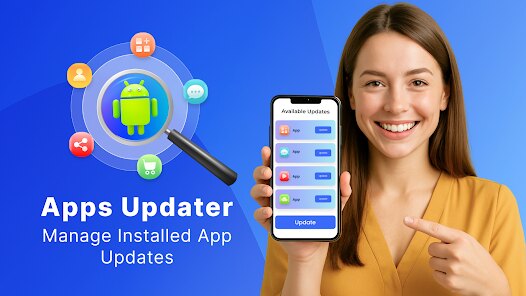
In the ever-evolving landscape of mobile technology, keeping your device running smoothly and securely is paramount. Enter Software Update for my phone, a specialized utility developed by Art & Tool Studio. This app carves out a unique niche by focusing squarely on one core function: managing and facilitating system updates for your Android device. Unlike bloated system optimizer suites packed with redundant features, this tool adopts a minimalist, no-frills approach. Its development philosophy seems centered on simplicity and direct utility, stripping away everything but the essential process of checking for, downloading, and installing the latest firmware. For users tired of navigating labyrinthine settings menus or waiting for carrier-delayed update notifications, this app presents a compelling, centralized solution.
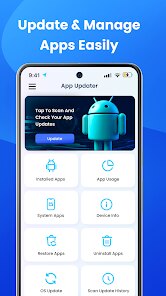
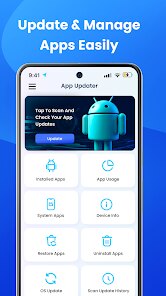
The usage experience is refreshingly straightforward. Upon launching, the app performs a swift scan, clearly indicating your current Android version and security patch level. With a single tap, it queries available updates, presenting the information in a clean, uncluttered interface. The process from check to installation is streamlined, reducing what can often be a multi-step chore into a few simple actions. It feels like having a dedicated technician for your phone's operating system, one that cuts through the red tape. I chose this software over similar utilities because of its singular focus and transparency. Many other apps in this category bury the update function among battery savers, junk cleaners, and RAM boosters, often accompanied by intrusive ads. Software Update for my phone does one job and aims to do it exceptionally well, with a user interface that prioritizes clarity over complexity.
Ultimately, this app addresses a fundamental need with elegance and efficiency. It demystifies the update process, making it accessible for users of all technical levels. In a digital age where security vulnerabilities are patched through these updates, having a reliable and prompt tool is not just convenient; it's a critical component of your device's health and your personal data security. If you value a clean, direct, and hassle-free method to ensure your phone is always running the latest and most secure software, this app is an indispensable addition to your toolkit. Don't let your device fall behind—take control of its core software today and download Software Update for my phone from the Google Play Store! 📱🔄🔍🚀🛡️💾👍🎯📲✨
features
- 🔍 Instant Update Scan: The app's primary feature is its rapid system analysis. It immediately checks your device's current software status against the latest available versions, providing clear, at-a-glance information without any delay.
- 📥 One-Tap Download & Install: Streamlining the entire process, this function allows you to initiate the download and installation of an available update with a single button press. It handles the background work, guiding you through the necessary steps like rebooting your device.
- 📊 Update History & Details: For those who like to keep records, the app provides access to your update history. It also displays detailed information about any pending or available update, such as version number, file size, and a summary of key changes or security patches included.
- 🔔 Smart Notification Alerts: You can configure the app to notify you when a new system update is detected. This proactive feature ensures you never miss an important security patch or feature enhancement, keeping you informed without manual checks.
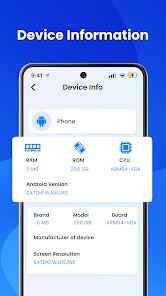
- ⚙️ Basic System Information: Beyond updates, the app surfaces essential device info, including your current Android version, security patch level, and build number. This offers a quick reference point for troubleshooting or general knowledge.
pros
- 🎯 Laser-Focused Functionality: The app's greatest strength is its dedication to a single task. There's no feature creep or unnecessary bloat, resulting in a fast, lightweight application that loads instantly and performs its core duty with precision.
- 👌 Extremely User-Friendly Interface: With its clean layout and intuitive design, the app is accessible to everyone. Technical processes are broken down into simple, guided steps, making system updates less daunting for non-tech-savvy users.
- 🚀 Speed and Efficiency: The scanning and checking processes are remarkably quick. The app eliminates the wait time often associated with the native system update checker, providing near-instantaneous results and a smoother overall workflow.
- 📵 Minimal Ad Intrusion (in free version): Compared to many utility apps, the advertising within the free version is relatively unobtrusive. It manages to support development without significantly disrupting the user experience or resorting to full-screen video ads.
- 🛡️ Promotes Device Security: By simplifying and highlighting the update process, the app actively encourages users to keep their devices patched against the latest security threats. It turns a neglected chore into a simple, routine task, directly enhancing your digital safety.
cons
- ⚠️ Limited Device Compatibility: The app's effectiveness is heavily dependent on your device manufacturer and carrier. It cannot magically produce updates that haven't been released by these parties, so its utility varies greatly across different phone models and regions.
- 🔋 Potential for Redundancy: For users with phones that have a well-implemented, automatic update system (like Google Pixels or recent Samsung devices), this app might feel redundant. It essentially provides a manual front-end for a process that may already happen seamlessly in the background.
- 📱 Basic Feature Set: The app is purely a facilitator. It lacks advanced features like scheduling updates, delta update management (downloading only changed files), or detailed technical logs that power users or developers might seek. Its simplicity can be a limitation for some.
- 🔗 Dependence on System Processes: Ultimately, the app triggers your phone's built-in update mechanisms. If there are underlying issues with your device's firmware or recovery system, the app cannot bypass them and may fail to complete an installation, which could be confusing for users.
- 🎨 Sparse Aesthetic Design: While functional, the interface is very basic. Users accustomed to modern, polished app designs with animations and custom themes might find the visual presentation somewhat utilitarian and lacking in visual flair.
Articles
![]()
How to Get Robux Safely Without Scams
![]()
How to Download Older Versions of Android Apps
![]()
How to Download Games on Google Play for the First Time
![]()
What Is an APK File for Android? Everything You Need to Know
![]()
Do Free Robux Generators Work?
![]()
Robux Pricing Guide (2026 Update): How Much Robux Really Costs
![]()
How to Avoid Scams in Roblox
![]()
Rarest Pets in Adopt Me! (2026 Update)
![]()
How to Trade Safely in Adopt Me! (So You Don't Lose Everything)
![]()
Secret Tricks Nobody Tells You in 'Steal a Brainrot'
![]()
Beginner Guide: Don't Lose Your Brainrot
![]()
How to Steal in 'Steal a Brainrot' Without Getting Caught (Or at Least Not Instantly)
![]()
Is Brookhaven RP Worth Playing? It Depends on What You’re Looking For
![]()
Why Blox Fruits Is So Popular? Here’s Why Everyone Keeps Playing It
![]()
Best Roblox Obby Games for Beginners (2026): Learn the Game Without Hitting a Wall
![]()
Top 10 Roblox Horror Games (2026): The Scariest Experiences You Can't Miss
















Hot Apps
-
![]()
PayByPhone
PayByPhone Technologies Inc .4.9

-
![]()
Telegram
Telegram FZ-LLC4.2 -
![]()
Venmo
PayPal, Inc.4.2 -
![]()
Hulu: Stream TV shows & movies
Disney4.5 -
![]()
Google Pay
Google LLC4.4 -
![]()
OfferUp: Buy. Sell. Letgo.
OfferUp Inc.4.4 -
![]()
Ford™
Ford Motor Co.4.7 -
![]()
ParkMobile: Park. Pay. Go.
Parkmobile, LLC4.3 -
![]()
Instagram
Instagram4.3 -
![]()
Google Chrome: Fast & Secure
Google LLC4.1 -
![]()
Zoom - One Platform to Connect
zoom.us4.1 -
![]()
YouTube
Google LLC4.1 -
![]()
Amazon Fire TV
Amazon Mobile LLC4.1 -
![]()
Google Gemini
Google LLC4.6 -
![]()
Passport Parking
Passport Labs, Inc.2.5 -
![]()
Domino's Pizza USA
Domino's Pizza LLC4.7 -
![]()
Affirm: Buy now, pay over time
Affirm, Inc4.7 -
![]()
Uber - Request a ride
Uber Technologies, Inc.4.6 -
![]()
Cash App
Block, Inc.4.5 -
![]()
Wise: International Transfers
Wise Payments Ltd.4.7 -
![]()
Perplexity - Ask Anything
PerplexityAI4.7 -
![]()
Amazon Alexa
Amazon Mobile LLC4.5 -
![]()
Pandora - Music & Podcasts
Pandora4.1 -
![]()
Direct Express®
i2c Inc.4.3 -
![]()
Geeni
Merkury Innovations4.6 -
![]()
Facebook
Meta Platforms, Inc.4 -
![]()
Snapchat
Snap Inc4.1 -
![]()
Chai: Chat AI Platform
Chai Research Corp.4.4 -
![]()
GasBuddy: Find & Pay for Gas
PDI Software, Inc.3.1 -
![]()
Klarna | Shop now. Pay later.
Klarna Bank AB (publ)4.3






























Disclaimer
1.Appinfocenter does not represent any developer, nor is it the developer of any App or game.
2.Appinfocenter provide custom reviews of Apps written by our own reviewers, and detailed information of these Apps, such as developer contacts, ratings and screenshots.
3. All trademarks, registered trademarks, brand names and company names or logos appearing on the site are the property of their respective owners.
4.Appinfocenter abides by the federal Digital Millennium Copyright Act (DMCA) by responding to notices of alleged infringement that complies with the DMCA and other applicable laws.
5.If you are the owner or copyright representative and want to delete your information, please contact us [email protected].
6.All the information on this website is strictly observed all the terms and conditions of Google Ads Advertising policies and Google Unwanted Software policy.
7.Appinfocenter.com is an independent, information-only website which is 100% free to all the users.