Volume Control Sound Launcher

500K+
Installs
AtomApplications
Developer
-
Productivity
Category
-
Everyone
Content Rating
-
https://phonevolumecontrol.com/privacy-policy
Privacy Policy
editor reviews
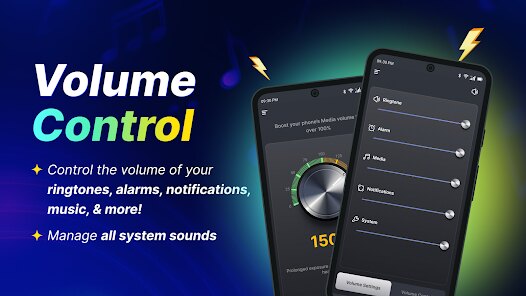
Let's be real for a second, hunting for the perfect way to manage your phone's audio can feel like a never-ending quest. 🎧 We're constantly bombarded with options, and most apps either overcomplicate a simple task or fail to deliver on the basics. I stumbled across the Volume Control Sound Launcher by AtomApplications, and honestly, it caught my attention by doing something surprisingly refreshing: it just works. 🤔 This isn't a flashy, over-designed piece of software; it's a utilitarian tool that focuses on providing quick, reliable access to your volume settings and sound profiles. 🛠️ After weeks of daily use across meetings, noisy commutes, and quiet evenings, I can confidently say it stands out for its sheer efficiency and thoughtful design. 💪
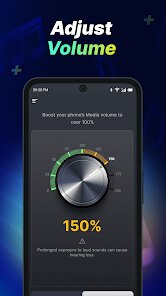
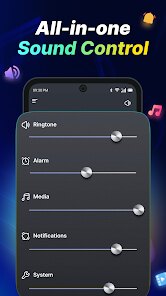
Using this app is an exercise in minimalist logic. You set up a few profiles—like "Meeting," "Outdoors," or "Night"—and assign specific volume levels for your media, alarms, ringtone, and notifications. 📉 Then, you place a widget on your home screen or use its notification bar toggle. That's it. One tap, and your phone's audio configuration changes instantly. 🚀 What sets it apart from the crowd, like standard system sliders or other volume managers, is its laser focus on profiles. Instead of fiddling with individual sliders, you choose a sonic environment. During a business lunch, I switch to my "Silent" profile, and the phone becomes a ghost. 👻 Leaving the office? A single tap on the "Loud" widget re-activates my normal levels. This context-switching ability is its killer feature, and it's the very reason I uninstalled every other volume app I had. 🤫
For anyone tired of muting their phone manually during meetings or struggling to hear notifications in a noisy environment, this app is a genuine lifesaver. 🦸♂️ It may not have 50 different features, but the core experience is polished to perfection. If you value your time and sanity over endless customization menus, do yourself a favor and download it from the Play Store. 📲 You'll immediately feel a weight lift off your shoulders. Your phone's audio management will finally become a forgettable, frictionless part of your day. Just try it once; you'll probably ask yourself why your manufacturer didn't build it this way. 😌
features
- 📱 Instant Profile Switching: The core of the app is its ability to change your entire soundscape in one tap. You define a profile (e.g., "Silent") that sets specific levels for ringtone, notifications, media, and alarms. Then, from a home screen widget or the notification drawer, tapping that profile instantly applies all those settings simultaneously, without you having to interact with any sliders.
- ⚙️ Highly Customizable Profiles: You aren't stuck with generic presets like "Silent" or "Vibrate." You can define a profile for any scenario imaginable. For example, you can create a "Podcast" profile that silences the ringer and notifications but sets media volume to 70%. Or a "Bedtime" profile that dims the media and notification volumes to 15% but keeps the alarm at 100%.
- 🎯 Dedicated Sound Launcher: This is more than just a volume controller; it acts as a launcher for sound-specific actions. You can configure a profile to also launch a music app (like Spotify or Poweramp) at a specific volume. So, a "Workout" profile could set media to 85% and then automatically open your running playlist, creating a perfect start to your gym session.
- 🔇 Granular Ringer & Alert Controls: Many volume managers treat all sounds the same. This app allows you to control ringer volume independently from notification volume. You can set your phone to ring loudly for calls but have a subtle buzz for texts. This level of detail is surprisingly rare and incredibly useful for tailoring your phone's behavior to your exact preference.
- ✅ Silent Schedule Automation: You can set up time-based triggers for your profiles. For instance, you can schedule your "Silent" profile to activate automatically every weekday at 9:00 AM and deactivate at 5:00 PM. This hands-off approach ensures your phone is appropriately muted for your standard workday without you having to manually toggle anything.
pros
- 🚀 Blazing Fast Performance: The app is incredibly lightweight and responsive. There is absolutely zero lag when switching profiles from the widget. You tap, and the volume changes are applied before your finger lifts from the screen. This snappiness makes it a joy to use, as it never interrupts your flow or makes you wait.
- 🧩 Simple & Intuitive Interface: The design philosophy is "form follows function." The main app screen is a clean list of your profiles. The settings menu is logically organized. There's no clutter, confusing graphics, or hidden menus. Even a non-tech-savvy user could set up their first profile in under a minute without any guidance.
- 🪶 Low Battery Impact: Because it performs a simple, singular task without running background services permanently, its battery drain is effectively negligible. You won't find it on your battery stats list. It just sits quietly, waiting for a tap, and then it's done. This is a huge plus in a world of bloated apps that drain your phone's life.
- 🔔 Effective Widget Options: The widgets are the primary control method, and they are thoughtfully designed. You get various sizes, from a 1x1 icon that shows your current profile to a larger 4x1 widget that lists several profiles at once. This flexibility lets you place exactly the control level you need right on your home screen.
- 🧘 Reliable Consistency: Since installing it, the app has never crashed, failed to apply a profile, or forgotten my custom settings. This rock-solid stability is its most underrated strength. You can depend on it to switch to "Silent" mode every time, which is critical when the alternative is getting yelled at in a meeting by a sudden ringtone.
cons
- 🔕 No Do Not Disturb Integration: While the app controls audio volumes, it does not integrate with Android's built-in Do Not Disturb (DND) mode. If you want to block visual interruptions like pop-up notifications or status bar icons, you'll need to manage DND separately. A profile that could toggle DND alongside volume would be a game-changer.
- 📶 Absence of Bluetooth Detection: A common omission is the lack of automatic profile switching based on connected accessories. For instance, you can't make it automatically switch to a "Car" profile when your phone connects to your car's Bluetooth. This would be a fantastic quality-of-life addition, removing the need for manual taps in common scenarios.
- 🎚️ No Per-App Volume Management: The app manages global volume levels for ringtone, notification, media, and alarms. It does not allow you to set specific volumes for individual applications. For example, you can't make your music player louder than your YouTube app on the same media stream. This level of granular control is missing for power users.
Articles
![]()
How to Get Robux Safely Without Scams
![]()
How to Download Older Versions of Android Apps
![]()
How to Download Games on Google Play for the First Time
![]()
What Is an APK File for Android? Everything You Need to Know
![]()
Do Free Robux Generators Work?
![]()
Robux Pricing Guide (2026 Update): How Much Robux Really Costs
![]()
How to Avoid Scams in Roblox
![]()
Rarest Pets in Adopt Me! (2026 Update)
![]()
How to Trade Safely in Adopt Me! (So You Don't Lose Everything)
![]()
Secret Tricks Nobody Tells You in 'Steal a Brainrot'
![]()
Beginner Guide: Don't Lose Your Brainrot
![]()
How to Steal in 'Steal a Brainrot' Without Getting Caught (Or at Least Not Instantly)
![]()
Is Brookhaven RP Worth Playing? It Depends on What You’re Looking For
![]()
Why Blox Fruits Is So Popular? Here’s Why Everyone Keeps Playing It
![]()
Best Roblox Obby Games for Beginners (2026): Learn the Game Without Hitting a Wall
![]()
Top 10 Roblox Horror Games (2026): The Scariest Experiences You Can't Miss
















Hot Apps
-
![]()
Google Chat
Google LLC4.4
-
![]()
Netflix
Netflix, Inc.3.9
-
![]()
SiriusXM: Music, Sports & News
SiriusXM4.6 -
![]()
Chai: Chat AI Platform
Chai Research Corp.4.4 -
![]()
Microsoft Teams
Microsoft Corporation4.6 -
![]()
PayPal - Send, Shop, Manage
PayPal Mobile4.3 -
![]()
Google Maps
Google LLC4.2 -
![]()
Uber - Request a ride
Uber Technologies, Inc.4.6 -
![]()
TikTok
TikTok Pte. Ltd.4.4 -
![]()
Klarna | Shop now. Pay later.
Klarna Bank AB (publ)4.3 -
![]()
Waze Navigation & Live Traffic
Waze3.9 -
![]()
Amazon Alexa
Amazon Mobile LLC4.5 -
![]()
Snapmint: Buy Now, Pay in EMIs
Snapmint4.5 -
![]()
Yuka - Food & cosmetic scan
Yuka App4.7 -
![]()
Google Gemini
Google LLC4.6 -
![]()
PolyBuzz: Chat with AI Friends
CLOUD WHALE INTERACTIVE TECHNOLOGY LLC.3.8 -
![]()
Google Chrome: Fast & Secure
Google LLC4.1 -
![]()
DoorDash - Food Delivery
DoorDash4.6 -
![]()
Hulu: Stream TV shows & movies
Disney4.5 -
![]()
MyFitnessPal: Calorie Counter
MyFitnessPal, Inc.4.3 -
![]()
TikTok
TikTok Pte. Ltd.4.4 -
![]()
Afterpay - Buy Now Pay Later
Afterpay3.8 -
![]()
Microsoft Copilot
Microsoft Corporation4.8 -
![]()
ParkMobile: Park. Pay. Go.
Parkmobile, LLC4.3 -
![]()
Signal Private Messenger
Signal Foundation4.5 -
![]()
CapCut - Video Editor
Bytedance Pte. Ltd.4 -
![]()
WhatsApp Messenger
WhatsApp LLC4.2 -
![]()
Geeni
Merkury Innovations4.6 -
![]()
Perplexity - Ask Anything
PerplexityAI4.7 -
![]()
Pinterest
Pinterest4.5






























Disclaimer
1.Appinfocenter does not represent any developer, nor is it the developer of any App or game.
2.Appinfocenter provide custom reviews of Apps written by our own reviewers, and detailed information of these Apps, such as developer contacts, ratings and screenshots.
3. All trademarks, registered trademarks, brand names and company names or logos appearing on the site are the property of their respective owners.
4.Appinfocenter abides by the federal Digital Millennium Copyright Act (DMCA) by responding to notices of alleged infringement that complies with the DMCA and other applicable laws.
5.If you are the owner or copyright representative and want to delete your information, please contact us [email protected].
6.All the information on this website is strictly observed all the terms and conditions of Google Ads Advertising policies and Google Unwanted Software policy.
7.Appinfocenter.com is an independent, information-only website which is 100% free to all the users.