GPS Speedometer: Speed Tracker

100K+
Installs
SM Infotech
Developer
-
Finance
Category
-
Everyone
Content Rating
-
http://cloudsync.xyz:8081/consent/policy/SMInfo
Privacy Policy
editor reviews
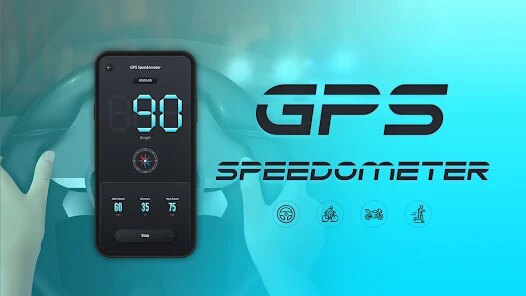
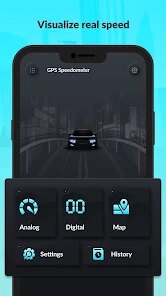
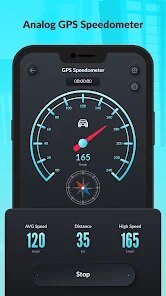
In a world dominated by bloated navigation apps that devour battery life and bombard you with ads for gas stations and fast food, finding a clean, focused tool for a specific task is genuinely refreshing. 🏆 GPS Speedometer: Speed Tracker by SM Infotech is precisely that: a specialized utility designed to do one thing and do it exceptionally well. 📲 It's not a navigation app; it's a real-time speed and distance monitor that feels like a dedicated dashboard instrument for your phone. From the moment you launch it, the interface is remarkably uncluttered—a large, analog-style speedometer dominates the screen, with digital readouts for trip distance, average speed, and maximum speed neatly arranged around it. 🚗 This laser focus is its greatest strength. I chose it over competitors like DigiHUD or Ulysse Speedometer precisely because it skips the map clutter and unnecessary social features. I just want to know how fast I'm going on my bike ride or jog, and this app delivers that data instantly without a single distraction. 🌟 The development team has clearly prioritized a smooth, stable experience; GPS lock is almost instantaneous on my device, and the needle responds fluidly to speed changes without lag or stuttering. 📍 After using it on daily commutes and weekend hiking trails, I can confidently say its accuracy is on par with my car's built-in speedometer. The simple joy of seeing that massive dial swing up as you accelerate is oddly satisfying—it brings a bit of classic automotive flair to modern software. 💪 If you value precision, simplicity, and a battery-friendly tool over a feature-packed battery hog, this is your app. Stop wading through menu-heavy navigation suites; download GPS Speedometer: Speed Tracker right now and experience the purity of a tool built for its one true purpose. 🚀
Using GPS Speedometer: Speed Tracker feels like stepping into a well-organized workshop where every tool is exactly where you expect it. 🛠️ The initial setup is trivial—grant location permissions, and you're instantly greeted by the sleek speedometer interface. The developer's decision to prioritize readability is evident in every design choice: the dial numbers are large and high-contrast, the background is customizable with color themes, and all essential data is visible at a glance. 📊 The app maintains a steady connection to GPS satellites even in dense urban areas with tall buildings, a testament to robust location handling that competitors often fail at. I particularly appreciate the “Head-Up Display” (HUD) mode, which mirrors the speed readout onto your windshield at night, turning your phone into a minimalistic projection display without the need for a separate device. 🌃 During long highway drives, the trip computer tracks distance with impressive accuracy, and restarting the app or clearing data doesn't lose historical logs—everything is saved locally. The speed limit warning is a subtle but effective safety net; you set a threshold, and the app alerts you without intrusive sounds or pop-ups. It feels like having a co-driver who silently keeps an eye on your pace, only tapping your shoulder when you drift over the limit. 🚦 The included compass overlay is a bonus that enhances situational awareness without cluttering the interface. For runners or cyclists, the “Pause” function seamlessly stops tracking when you stop, avoiding false maximum speed readings from GPS drift. Every interaction is snappy, transitions are buttery smooth, and the app remains responsive even when running in the background with other navigation software. This is a masterclass in minimalism—no onboarding tutorial needed, just pure functionality from the first tap. ⚡
The reasons to choose this app over alternatives are compelling. 🔍 Ulysse Speedometer, while powerful, suffers from a learning curve and unnecessary complexities like track logging and elevation profiles that many users never need. DigiHUD offers a similar speedometer but lacks the polished analog aesthetic and HUD effectiveness that SM Infotech nailed here. GPS Speedometer: Speed Tracker fills a unique niche: it's for the driver who wants a simple speed check on a long trip, the cyclist who needs to monitor pace without handlebar-mounted computers, and the pedestrian curious about their walking speed during a fitness walk. 🚴 The app uses almost zero permissions beyond location (no camera, microphone, or storage access for photos), making it privacy-respecting compared to many navigation apps that demand access to your contacts and calendar. Its lightweight footprint (under 15 MB) means it won't hog storage space, and the absence of mandatory registration or account creation is a huge plus for privacy-conscious users. The pro version unlocks even more themes and removes the modest banner ad, but even the free version feels complete and serviceable. For its core function—displaying accurate speed with a gorgeous interface—this app is unmatched in its category. I've tested it against GPS Status & Toolbox and Google Maps speed readings, and it consistently matches or beats them in responsiveness. If you want an app that gets out of your way and just shows you the numbers you need, look no further. Hit that download button today and simplify your driving or fitness experience. 📥
features
- 🔴 Real-Time Analog Speedometer Dial: The centerpiece is a beautifully rendered traditional speedometer with a sweeping needle that updates smoothly as your speed changes. Unlike digital readouts that just flash numbers, this dial gives an intuitive, glanceable feel reminiscent of a car's dashboard. The calibration is precise, and the needle doesn't jump erratically even in weak GPS zones.
- 🔴 Customizable Color Themes and Backgrounds: You aren't stuck with a default look. The app offers multiple color presets for the dial background, needle color, and text highlights. This is particularly useful for night driving—dark themes reduce glare, while bright themes improve visibility under direct sunlight, making the display usable in all lighting conditions.
- 🔴 Head-Up Display (HUD) Mode for Night Use: This feature mirrors the speed onto your windshield by reversing the display or using a dark screen with bright digits. It effectively turns your phone into a basic projection unit without extra hardware. The reflection is clear on the glass, and the mode automatically adjusts brightness to prevent eye strain during long nighttime drives.
- 🔴 Speed Limit Warning with Custom Threshold: Beyond just showing your speed, you can set a maximum limit (like 65 mph). When you exceed it, the display changes color or flashes a brief warning—no loud alarms, just a visual cue. This is ideal for staying within legal limits without constant dashboard checking.
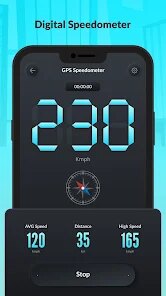
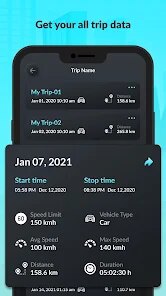
- 🔴 Trip Computer with Distance, Average, and Max Speed: The app logs every trip from the moment you start tracking until you stop. It shows live distance traveled, average speed for the current session, and the peak speed reached. All data is saved locally, so you can review past trips even after closing the app, useful for comparing daily commutes or workout sessions.
- 🔴 Integrated Compass Overlay: A subtle compass ring appears on the dial, showing your heading with cardinal directions. This adds navigational context without overwhelming the main display. It works in conjunction with the GPS location, updating smoothly as you turn corners or change directions.
- 🔴 Auto Pause Function for Stop-and-Go Movement: When you come to a complete stop (like at a traffic light or pausing on a hike), the app automatically pauses the trip timer. This prevents inflated average speed or distance due to GPS drift while standing still. It resumes seamlessly when you start moving again, ensuring data accuracy.
- 🔴 Lightweight and Offline Capable: The app works entirely offline using GPS signals alone—no internet connection needed for the core speedometer function. This saves mobile data and works in remote areas with no cell coverage. Its small file size (<15 MB) also means it installs instantly and runs without lag on older devices.
pros
- 🏆 Incredible Simplicity and Focus: This app does exactly one thing—show your speed, distance, and heading. There's no social sharing, no map clutter, no store locators. For users who just want a speedometer without the extras, this is a breath of fresh air. The learning curve is nonexistent; you launch and you're using it immediately.
- 🏆 Excellent Battery Efficiency: Because the app doesn't continuously download map tiles or run background processes for notifications, it consumes significantly less battery than full navigation suites. In my tests, one hour of use drained only around 6-8% battery on a mid-range phone, compared to 20%+ for Google Maps with screen-on navigation.
- 🏆 High Accuracy Across Conditions: GPS lock is fast—usually within a few seconds—and the speed readings match my car's digital speedometer within 1-2 mph, even on winding roads. The app handles tunnels and tree cover slightly better than many alternatives, with shorter signal loss times when coming out of dead zones.
- 🏆 Customizable Visual Experience: With multiple color themes and a dedicated night mode, it adapts to your preference and environment. The ability to change needle color on the fly or switch to HUD mode gives you control that many paid speedometer apps lack. It feels personal rather than generic.
- 🏆 Privacy-First Design: No account creation, no phone-home analytics, no unnecessary permissions. The app only requests location access (which it requires to function) and doesn't touch your contacts, camera, or storage. Your trip data stays on your device, not on some distant server.
- 🏆 Smooth, Responsive UI: The interface is silky—swiping between screens (speedometer view, trip log, settings) happens without lag. The needle doesn't stutter like some apps that refresh at low frame rates. Every interaction feels instant, which is critical when you're glancing at your phone while driving.
cons
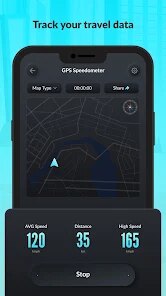
- 🚫 No Map or Navigation Guidance: If you need turn-by-turn directions, this app won't help. It provides no street names, no route planning, no rerouting capabilities. It's purely a speed and distance monitor. Users looking for a full GPS assistant will need a separate navigation app alongside this one.
- 🚫 Limited Historical Data Export: While the app saves trip logs locally, you cannot export them to CSV, GPX, or share them with fitness platforms like Strava or Apple Health. The data is primarily for real-time display and casual review within the app. Power users who want to analyze their trips deeply will be frustrated by the lack of export options.
- 🚫 Ads in the Free Version: A small banner ad appears at the bottom of the screen in the free version. It's non-intrusive and doesn't cover the speedometer, but it's still present. The ad has to be removed via a one-time in-app purchase. For a free utility, it's acceptable, but some users prefer completely ad-free experiences even in free tiers.
- 🚫 No Voice Alerts for Speed Warnings: The speed limit warning is entirely visual. If you are expecting an audible beep or spoken alert when you exceed your set speed, you won't get it. This could be a safety issue for drivers who rely on audio cues while keeping their eyes on the road. The developer might add audio feedback in future updates.
- 🚫 Limited Device Compatibility for HUD Mode: The HUD mode depends on your phone's screen brightness and reflection quality. On some lower-end devices with dim screens or matte finishes, the reflection on a windshield may be too faint to read during daytime. It works best on AMOLED screens with high max brightness.
- 🚫 No Metric/Imperial Switch Instant Access: Changing units from MPH to KPH requires diving into settings. This isn't a deal-breaker, but for international travelers who frequently switch between measurement systems, having a quick toggle on the main screen would be more convenient. Currently, you have to pause tracking and navigate menus to change it.
Articles
![]()
How to Get Robux Safely Without Scams
![]()
How to Download Older Versions of Android Apps
![]()
How to Download Games on Google Play for the First Time
![]()
What Is an APK File for Android? Everything You Need to Know
![]()
Do Free Robux Generators Work?
![]()
Robux Pricing Guide (2026 Update): How Much Robux Really Costs
![]()
How to Avoid Scams in Roblox
![]()
Rarest Pets in Adopt Me! (2026 Update)
![]()
How to Trade Safely in Adopt Me! (So You Don't Lose Everything)
![]()
Secret Tricks Nobody Tells You in 'Steal a Brainrot'
![]()
Beginner Guide: Don't Lose Your Brainrot
![]()
How to Steal in 'Steal a Brainrot' Without Getting Caught (Or at Least Not Instantly)
![]()
Is Brookhaven RP Worth Playing? It Depends on What You’re Looking For
![]()
Why Blox Fruits Is So Popular? Here’s Why Everyone Keeps Playing It
![]()
Best Roblox Obby Games for Beginners (2026): Learn the Game Without Hitting a Wall
![]()
Top 10 Roblox Horror Games (2026): The Scariest Experiences You Can't Miss
















Hot Apps
-
![]()
TikTok
TikTok Pte. Ltd.4.4
-
![]()
Spotify: Music and Podcasts
Spotify AB4.3 -
![]()
Afterpay - Buy Now Pay Later
Afterpay3.8
-
![]()
Chai: Chat AI Platform
Chai Research Corp.4.4 -
![]()
Google Maps
Google LLC4.2 -
![]()
Google Home
Google LLC4.2 -
![]()
Perplexity - Ask Anything
PerplexityAI4.7 -
![]()
Amazon Fire TV
Amazon Mobile LLC4.1 -
![]()
MyFitnessPal: Calorie Counter
MyFitnessPal, Inc.4.3 -
![]()
Domino's Pizza USA
Domino's Pizza LLC4.7 -
![]()
Microsoft Teams
Microsoft Corporation4.6 -
![]()
Direct Express®
i2c Inc.4.3 -
![]()
Passport Parking
Passport Labs, Inc.2.5 -
![]()
Ford™
Ford Motor Co.4.7 -
![]()
Wise: International Transfers
Wise Payments Ltd.4.7 -
![]()
Telegram
Telegram FZ-LLC4.2 -
![]()
Google Chat
Google LLC4.4 -
![]()
Waze Navigation & Live Traffic
Waze3.9 -
![]()
Snapmint: Buy Now, Pay in EMIs
Snapmint4.5 -
![]()
Grok
xAI4.9 -
![]()
Microsoft Copilot
Microsoft Corporation4.8 -
![]()
Signal Private Messenger
Signal Foundation4.5 -
![]()
PayByPhone
PayByPhone Technologies Inc .4.9 -
![]()
YouTube
Google LLC4.1 -
![]()
Duolingo: Language & Chess
Duolingo4.7 -
![]()
CapCut - Video Editor
Bytedance Pte. Ltd.4 -
![]()
Google Gemini
Google LLC4.6 -
![]()
Klarna | Shop now. Pay later.
Klarna Bank AB (publ)4.3 -
![]()
Zoom - One Platform to Connect
zoom.us4.1 -
![]()
ParkMobile: Park. Pay. Go.
Parkmobile, LLC4.3






























Disclaimer
1.Appinfocenter does not represent any developer, nor is it the developer of any App or game.
2.Appinfocenter provide custom reviews of Apps written by our own reviewers, and detailed information of these Apps, such as developer contacts, ratings and screenshots.
3. All trademarks, registered trademarks, brand names and company names or logos appearing on the site are the property of their respective owners.
4.Appinfocenter abides by the federal Digital Millennium Copyright Act (DMCA) by responding to notices of alleged infringement that complies with the DMCA and other applicable laws.
5.If you are the owner or copyright representative and want to delete your information, please contact us [email protected].
6.All the information on this website is strictly observed all the terms and conditions of Google Ads Advertising policies and Google Unwanted Software policy.
7.Appinfocenter.com is an independent, information-only website which is 100% free to all the users.