
Tripo - AI 3D Model Generator




500K+
Installs
Tripo AI
Developer
-
Art & Design
Category
-
Everyone
Content Rating
-
https://www.tripo3d.ai/privacy
Privacy Policy
editor reviews
Tripo - AI 3D Model Generator is a game-changer for anyone who has ever wrestled with traditional 3D modeling software. I remember spending countless hours in Blender and Maya, fighting with vertices and edge loops just to create a simple character. Tripo completely flips that script. Instead of manually sculpting every detail, you just type a text prompt or upload a reference image, and within minutes, you get a fully textured, ready-to-use 3D model. It is like having a digital sculptor that never sleeps, never complains, and always delivers. The interface is clean and intuitive, so even if you have zero prior experience, you can jump right in and start generating. What really sold me was its integration into my existing workflow - I can export models in FBX, OBJ, and glTF formats without any hassle, which means it slots perfectly into Unity, Unreal, or Blender pipelines. When I compared it to other tools like Meshy or Luma AI, Tripo stood out because of its raw speed and the consistency of its mesh quality. Most competitors either take too long or produce models that require heavy cleanup. Tripo nails it on the first pass a shocking percentage of the time.
The development trajectory of Tripo has been impressive too. The team behind it clearly listens to user feedback. Early versions had issues with topology, but the current iteration produces clean, quad-based meshes that are animator-friendly. The texturing has also improved dramatically - materials now have proper PBR maps, which makes a huge difference when you light your scenes. I have used it for game assets, architectural visualization, and even for prototyping 3D prints. Every time, the results were either production-ready or required only minor tweaks. The tool also has a neat feature where you can generate multiple variations of the same prompt, allowing you to pick the best take. This creative freedom is something you simply do not get with traditional modeling. There are also community-generated styles and presets that help you achieve different aesthetics, from cartoonish to hyper-realistic, without having to fiddle with complex shader networks. The learning curve is practically non-existent, and the onboarding tutorial is concise but thorough.
If you are on the fence about trying Tripo, let me push you over the edge. Whether you are a solo indie developer, a 3D artist looking to speed up your blockout phase, or a hobbyist who just wants to make cool stuff for fun, this app will change your creative process for the better. It saves you so much time that you will wonder how you ever managed without it. The free tier gives you a generous number of credits to experiment, and the paid plans are reasonably priced compared to hiring a freelance modeler or burning hours of your own time. I have personally recommended Tripo to at least a dozen colleagues, and every single one has come back with a smile and a folder full of new assets. Stop hesitating and give it a shot. Download Tripo AI today and unlock a whole new dimension of creativity. You will not regret it.
features
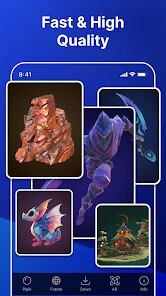
- 🚀 Instant Generation: Tripo takes your text prompt or image and produces a high-quality 3D mesh in under five minutes. You do not need to wait around or babysit the process; just set it and come back to a finished model ready for import.
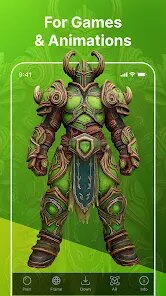
- 🎨 PBR Texturing: Every generated model comes with physically-based rendering maps, including albedo, normal, roughness, and metallic. This means your assets will look stunning in any modern game engine or renderer without extra work on your part.
- 🔧 Mesh Topology: The underlying polygon structure is clean and optimized. You get quad-dominant meshes that are easy to retopologize, animate, or modify. This is a huge time-saver compared to messy scans that require hours of cleanup.
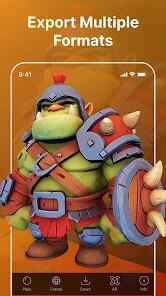
- 📦 Multiple Export Formats: Tripo supports OBJ, FBX, GLB, and glTF. That is a full spectrum of formats, so you can move your creations into Blender, Maya, Unity, Unreal, or Three.js with zero friction.
- 📏 Scale Accuracy: You can specify real-world dimensions for your object, whether it is a chair that should be 45 centimeters tall or a skyscraper that is 300 meters. This precision is vital for architectural and product design work.
- 🔄 Variation Control: For each prompt, you can ask for multiple iterations with slight variations. This allows you to explore different design directions quickly and select the one that fits your vision best.
- 🧊 Style Transfer: The tool includes a library of artistic styles that you can apply, from low-poly voxel art to high-detail photorealistic scans. This helps you match the aesthetic of your existing project without rebuilding assets from scratch.
pros
- ⚡ Blazing Fast Workflow: The speed is the single biggest win. What used to take me a full weekend now takes a coffee break. This does not just save time; it frees up mental energy for the more creative aspects of your project, like composition and storytelling.
- 🧩 Beginner Friendly: You do not need a degree in 3D art to use this. If you can type a sentence, you can generate a model. The user interface is so straightforward that your grandmother could probably figure it out, and that inclusivity is a massive plus for the hobbyist community.
- 🔁 Iterative Design Input: You can feed Tripo a rough sketch or a grayscale depth map, and it will turn that into a fully fleshed-out 3D object. This feature is brilliant for concept artists who want to give tangible form to their 2D sketches rapidly.
- 💾 Cost Effective: Hiring a modeler or buying a dedicated high-end sculpting tablet and software is expensive. Tripo's subscription model is a fraction of that cost, and the free tier is actually useful for occasional projects. This democratizes 3D content creation for everyone.
- 🛠️ Reliable Output: The failure rate is low. I have generated hundreds of models, and only a handful had any geometric flaws. When issues do pop up, they are usually minor and fixable in a few clicks. This reliability means you can trust it for production workflows, not just hobby projects.
- 🌀 Cloud-Based Processing: No need for a high-end GPU. Tripo does all the heavy lifting on their servers, so even a modest laptop can generate complex models. This accessibility is a huge advantage for students and creators on a budget.
cons
- ⏳ Internet Dependency: Since everything runs in the cloud, you are completely at the mercy of your internet connection. A slow or unstable network can ruin your momentum, and you cannot use the app offline. For those who travel or work in remote areas, this is a real drawback.
- 🔞 Content Filters: The AI has strict content moderation. While this is generally good, it occasionally over-censors. Trying to generate a creature with certain traits or a particular anatomical feature might get blocked, even if your intent is purely artistic or educational. This can be frustrating when you push the boundaries.
- 🔍 Limited Fine Control: You cannot edit the mesh directly inside Tripo. If you need to adjust a single vertex or modify a small section of the model, you have to export it to another tool. This extra step breaks the seamless flow and adds time to your pipeline.
- 💸 Credit System Complexity: The credit system can be a bit confusing for new users. Each generation costs a certain number of credits, and variations cost more. You might run out faster than expected, especially if you are experimenting with complex prompts. The pricing page could be clearer about the exact costs per action.
- 🎲 Inconsistent Detail on Complex Prompts: If your prompt involves multiple interacting objects or a very detailed scene, Tripo sometimes simplifies the geometry. It excels at single, well-defined objects, but struggles with intricate compositions like a dragon fighting a knight on a bridge. You will need to break those scenes down into parts.
Articles
![]()
How to Get Robux Safely Without Scams
![]()
How to Download Older Versions of Android Apps
![]()
How to Download Games on Google Play for the First Time
![]()
What Is an APK File for Android? Everything You Need to Know
![]()
Do Free Robux Generators Work?
![]()
Robux Pricing Guide (2026 Update): How Much Robux Really Costs
![]()
How to Avoid Scams in Roblox
![]()
Rarest Pets in Adopt Me! (2026 Update)
![]()
How to Trade Safely in Adopt Me! (So You Don't Lose Everything)
![]()
Secret Tricks Nobody Tells You in 'Steal a Brainrot'
![]()
Beginner Guide: Don't Lose Your Brainrot
![]()
How to Steal in 'Steal a Brainrot' Without Getting Caught (Or at Least Not Instantly)
![]()
Is Brookhaven RP Worth Playing? It Depends on What You’re Looking For
![]()
Why Blox Fruits Is So Popular? Here’s Why Everyone Keeps Playing It
![]()
Best Roblox Obby Games for Beginners (2026): Learn the Game Without Hitting a Wall
![]()
Top 10 Roblox Horror Games (2026): The Scariest Experiences You Can't Miss














Hot Apps
-
![]()
Instagram
Instagram4.3
-
![]()
Bolt: Request a Ride
Bolt Technology4.8
-
![]()
Klarna | Shop now. Pay later.
Klarna Bank AB (publ)4.3 -
![]()
Telegram
Telegram FZ-LLC4.2 -
![]()
Google Chrome: Fast & Secure
Google LLC4.1 -
![]()
YouTube
Google LLC4.1 -
![]()
PayPal - Send, Shop, Manage
PayPal Mobile4.3 -
![]()
Facebook
Meta Platforms, Inc.4 -
![]()
letgo: Buy & Sell Used Stuff
letgo3.3 -
![]()
Wise: International Transfers
Wise Payments Ltd.4.7 -
![]()
Google Maps
Google LLC4.2 -
![]()
Blink Home Monitor
Immedia Semiconductor4 -
![]()
OfferUp: Buy. Sell. Letgo.
OfferUp Inc.4.4 -
![]()
DeepSeek - AI Assistant
DeepSeek4.2 -
![]()
Google Gemini
Google LLC4.6 -
![]()
SiriusXM: Music, Sports & News
SiriusXM4.6 -
![]()
GroupMe
GroupMe4.5 -
![]()
Google Home
Google LLC4.2 -
![]()
Google Pay
Google LLC4.4 -
![]()
Amazon Fire TV
Amazon Mobile LLC4.1 -
![]()
Geeni
Merkury Innovations4.6 -
![]()
GasBuddy: Find & Pay for Gas
PDI Software, Inc.3.1 -
![]()
Ford™
Ford Motor Co.4.7 -
![]()
TikTok
TikTok Pte. Ltd.4.4 -
![]()
Uber - Request a ride
Uber Technologies, Inc.4.6 -
![]()
ChatBot - AI Chat
X PhotoKit4.5 -
![]()
Chai: Chat AI Platform
Chai Research Corp.4.4 -
![]()
CapCut - Video Editor
Bytedance Pte. Ltd.4 -
![]()
Pinterest
Pinterest4.5 -
![]()
Yuka - Food & cosmetic scan
Yuka App4.7






























Disclaimer
1.Appinfocenter does not represent any developer, nor is it the developer of any App or game.
2.Appinfocenter provide custom reviews of Apps written by our own reviewers, and detailed information of these Apps, such as developer contacts, ratings and screenshots.
3. All trademarks, registered trademarks, brand names and company names or logos appearing on the site are the property of their respective owners.
4.Appinfocenter abides by the federal Digital Millennium Copyright Act (DMCA) by responding to notices of alleged infringement that complies with the DMCA and other applicable laws.
5.If you are the owner or copyright representative and want to delete your information, please contact us [email protected].
6.All the information on this website is strictly observed all the terms and conditions of Google Ads Advertising policies and Google Unwanted Software policy.
7.Appinfocenter.com is an independent, information-only website which is 100% free to all the users.