Keyboard Escape: Speed Fast

100K+
Installs
Audrey89
Developer
-
Aciton
Category
-
Everyone
Content Rating
-
https://doc-hosting.flycricket.io/audrey89-privacy-policy/e1943513-8407-4732-a106-281c51fe8583/privacy
Privacy Policy
editor reviews
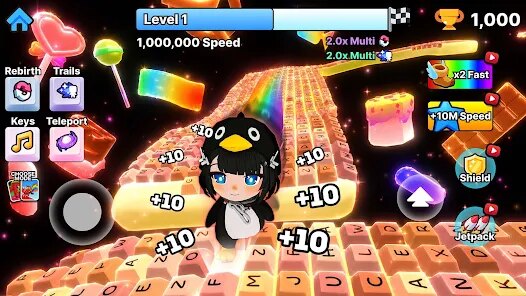
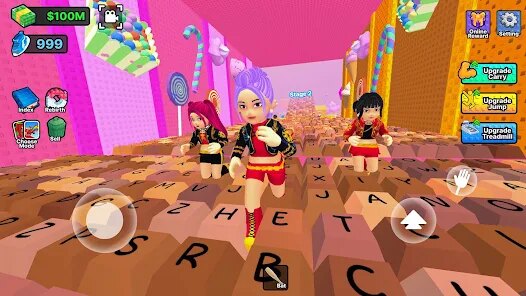
Keyboard Escape: Speed Fast is, at its core, a high-octane typing and reflex challenge that mashes up the frantic energy of speedrunning with the precision of a keyboard-focused puzzle. It's a hybrid—part action game, part cognitive workout—where you're not just dodging obstacles or shooting enemies; you're literally escaping virtual rooms by typing out sequences of letters, words, or codes as fast as your fingers can fly. The genre sits somewhere between a typing tutor and an arcade runner, but it feels far more like a pure adrenaline rush than any educational tool. I'd say this will click most with players who love leaderboard chasing, people who enjoy games like Typing of the Dead or even rhythm games, and anyone who secretly enjoys showing off their WPM. I initially stumbled upon it during a late-night scroll through indie game forums, where a gif of someone's hands blurring over a keyboard while the screen screamed neon got me instantly curious.
My first session was a delightful slap in the face. I expected a slow tutorial, but within thirty seconds, I was already sweating. The opening level throws you into a room with a locked door, and a countdown timer appears—you must type the highlighted code on the wall to unlock it. That's the basic loop, but it expands cleverly. Some rooms require you to type full sentences to disable laser grids, others ask for rapid-fire single letters to keep a pressure plate from resetting. The controls are, obviously, keyboard-only, which is perfect, but the performance is where it shines; I ran it on a mid-tier laptop, and the 60fps lock never dropped, even with particle explosions and screen shake going off. The learning curve is steep but fair—you'll fail your first few runs, but the game floods you with “type speed” meters and accuracy stats that make you hyper-aware of your weaknesses. One standout moment was a boss-like segment where I had to type a long, nonsensical string while a giant wall of light pushed me backwards. My heart was pounding, I mistyped three times, but the game didn't punish me with a death—it just slowed the wall. That mercy mechanic kept me immersed instead of frustrated, and I found myself instantly adopting a new trick: I started lightly tapping my left hand on the desk to warm up before each attempt, which genuinely improved my runs.
What makes me stick with Keyboard Escape: Speed Fast over other typing games is its sense of genuine momentum. Sure, there are similar tools and games out there, but most of them feel like sterile tests. This one feels like a sport. The progression system is rewarding without being greedy—you earn keys that unlock cosmetic skins for your cursor and background themes, but none of them affect gameplay, so it never feels pay-to-win. There are no microtransactions at all, which is rare for a free-to-play indie title. The community is also a huge factor; there are daily “escape marathons” where you race against a ghost of the top player, and seeing just how much faster they are drives you to improve. It also lets you import your own text files to practice with, so I've been using it to drill my vocabulary—that cross-functional utility is a massive draw. Honestly, it stands out because it respects your time; no filler quests, no grinding, just pure, clean gameplay loops that get your blood pumping.
features
- Typing Speed Precision ⚡ — Every action is tied to a typing input, so your physical keyboard accuracy directly translates to in-game success. You'll find that simple movement keys are replaced by context-specific words or codes, forcing you to think and type simultaneously. The game measures your accuracy on each key press and adjusts enemy spawns or obstacle speed based on your performance, creating a dynamic difficulty curve that adapts to your skill level.
- Challenge Modes 🌀 — Beyond the story mode, there are specific challenge rooms like “No Mistake Allowed” where one wrong character resets the entire puzzle, or “Timed Chaos” where every second is precious. These modes aren't just gimmicks; they change your strategy completely. In the “Reverse Mode,” the words are typed backwards, which messes with your muscle memory in a delightful way, pushing you to develop a new layer of cognitive flexibility.
- Performance Dashboards 📊 — After every level, you get a detailed breakdown of your typing speed, accuracy, and even which fingers are your weakest. This isn't just a stat sheet; it highlights specific keys you overuse or hesitate on. You can then auto-generate custom practice rooms that focus only on those problem keys, making your training efficient and purpose-driven.
pros
- Pure Fairness 💖 — I love that there's zero randomness in the gameplay. Every obstacle and code is laid out in a deterministic pattern, so when you fail, it's entirely on your speed and accuracy, not bad luck. This makes every victory feel earned and every loss feel like a personal challenge to improve. It's the same reason I used to love old-school arcade games—the machine never cheats.
- Synesthetic Feedback 🎨 — The visual and audio design is tightly synced to your typing. Correct keystrokes produce satisfying clicks and small particle bursts, while errors cause a low, rumbling buzz. This sensory feedback loop makes you feel like you're playing an instrument. The chiptune soundtrack speeds up or slows down based on your typing tempo, making you feel completely embedded in the game world.
- No Punishment for Experimentation 🧪 — If you want to try a crazy strategy, like typing with only your left hand or setting your keyboard on a steep angle, the game doesn't penalize you or block progress. You can fail a level as many times as you want, and there's always a “practice” mode that lets you run any level without the timer. This encourages creative problem-solving and makes the game deeply accessible to players of all skill levels.
cons
- Steep Early Wall 🚧 — The difficulty jumps quite quickly from the first to the second world. I found that players who don't already type above 60 WPM will hit a frustrating wall very early on. There's a softer difficulty curve needed, or at least a more comprehensive built-in warm-up tool, because the current “easy” mode still demands decent speed to even pass the tutorial.
- Limited Art Variety 🎨 — While the neon aesthetic is cool, after ten hours, the backgrounds and room layouts start to look repetitive. A few more environmental themes, or even user-created levels, would add a lot of longevity. As it stands, the visual variety doesn't match the mechanical depth, which is a bit of a letdown for a game so focused on repeating levels to improve.
- Occasional Keyboard Ghosting ⌨️ — The game assumes you have a proper anti-ghosting keyboard. On my standard office keyboard, pressing certain letter combinations (like A, S, and D together followed by a rapid F) sometimes registered incorrectly. This isn't the game's fault, but it's a barrier to entry for casual players using basic keyboards, and a little on-screen warning or calibration tool could help mitigate the frustration.
Articles
![]()
How to Get Robux Safely Without Scams
![]()
How to Download Older Versions of Android Apps
![]()
How to Download Games on Google Play for the First Time
![]()
What Is an APK File for Android? Everything You Need to Know
![]()
Do Free Robux Generators Work?
![]()
Robux Pricing Guide (2026 Update): How Much Robux Really Costs
![]()
How to Avoid Scams in Roblox
![]()
Rarest Pets in Adopt Me! (2026 Update)
![]()
How to Trade Safely in Adopt Me! (So You Don't Lose Everything)
![]()
Secret Tricks Nobody Tells You in 'Steal a Brainrot'
![]()
Beginner Guide: Don't Lose Your Brainrot
![]()
How to Steal in 'Steal a Brainrot' Without Getting Caught (Or at Least Not Instantly)
![]()
Is Brookhaven RP Worth Playing? It Depends on What You’re Looking For
![]()
Why Blox Fruits Is So Popular? Here’s Why Everyone Keeps Playing It
![]()
Best Roblox Obby Games for Beginners (2026): Learn the Game Without Hitting a Wall
![]()
Top 10 Roblox Horror Games (2026): The Scariest Experiences You Can't Miss












Hot Apps
-
![]()
Direct Express®
i2c Inc.4.3
-
![]()
Hulu: Stream TV shows & movies
Disney4.5
-
![]()
Microsoft Copilot
Microsoft Corporation4.8 -
![]()
TikTok
TikTok Pte. Ltd.4.4 -
![]()
Venmo
PayPal, Inc.4.2 -
![]()
Sora by OpenAI
OpenAI4.7 -
![]()
Perplexity - Ask Anything
PerplexityAI4.7 -
![]()
Affirm: Buy now, pay over time
Affirm, Inc4.7 -
![]()
Snapchat
Snap Inc4.1 -
![]()
GasBuddy: Find & Pay for Gas
PDI Software, Inc.3.1 -
![]()
Pinterest
Pinterest4.5 -
![]()
DoorDash - Food Delivery
DoorDash4.6 -
![]()
Cash App
Block, Inc.4.5 -
![]()
Google Maps
Google LLC4.2 -
![]()
Chai: Chat AI Platform
Chai Research Corp.4.4 -
![]()
YouTube
Google LLC4.1 -
![]()
ChatGPT
OpenAI4.7 -
![]()
PolyBuzz: Chat with AI Friends
CLOUD WHALE INTERACTIVE TECHNOLOGY LLC.3.8 -
![]()
WhatsApp Messenger
WhatsApp LLC4.2 -
![]()
Instagram
Instagram4.3 -
![]()
PayByPhone
PayByPhone Technologies Inc .4.9 -
![]()
Google Home
Google LLC4.2 -
![]()
Ticketmaster-Buy, Sell Tickets
Ticketmaster L.L.C.3 -
![]()
Spotify: Music and Podcasts
Spotify AB4.3 -
![]()
ChatOn - AI Chat Bot Assistant
AIBY Inc.4.4 -
![]()
Google Chrome: Fast & Secure
Google LLC4.1 -
![]()
Snapmint: Buy Now, Pay in EMIs
Snapmint4.5 -
![]()
Microsoft Teams
Microsoft Corporation4.6 -
![]()
TikTok
TikTok Pte. Ltd.4.4 -
![]()
Passport Parking
Passport Labs, Inc.2.5






























Disclaimer
1.Appinfocenter does not represent any developer, nor is it the developer of any App or game.
2.Appinfocenter provide custom reviews of Apps written by our own reviewers, and detailed information of these Apps, such as developer contacts, ratings and screenshots.
3. All trademarks, registered trademarks, brand names and company names or logos appearing on the site are the property of their respective owners.
4.Appinfocenter abides by the federal Digital Millennium Copyright Act (DMCA) by responding to notices of alleged infringement that complies with the DMCA and other applicable laws.
5.If you are the owner or copyright representative and want to delete your information, please contact us [email protected].
6.All the information on this website is strictly observed all the terms and conditions of Google Ads Advertising policies and Google Unwanted Software policy.
7.Appinfocenter.com is an independent, information-only website which is 100% free to all the users.