Rolling Icon: 3D Wallpaper

10M+
Installs
Maxlabs Personalization Tools
Developer
-
Productivity
Category
-
Everyone
Content Rating
-
https://www.maxlabs.hk/privacy-policy
Privacy Policy
editor reviews
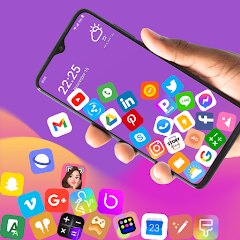
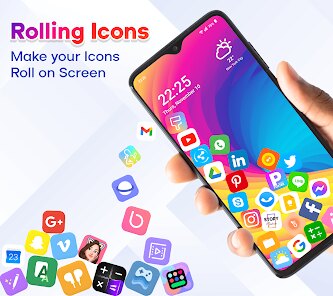
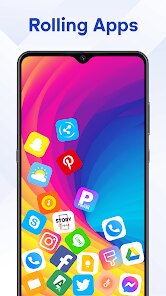
In the ever-crowded world of smartphone personalization, finding a wallpaper app that genuinely feels fresh and dynamic can be a real challenge. Many offer static images or simplistic animations, but few capture a sense of depth and playful interaction. Enter Rolling Icon: 3D Wallpaper, developed by AZ Mobile Software. This app immediately distinguishes itself by transforming your home screen into a lively, three-dimensional playground where your app icons don't just sit there—they roll, bounce, and interact with physics-based realism. The core concept is brilliantly simple yet executed with impressive polish: your icons behave like physical objects on a textured surface, reacting to tilts, swipes, and taps. The development focus is clearly on creating an immersive, fun experience rather than just another gallery of pretty pictures. From the moment you apply your first live wallpaper, the difference is palpable; your device feels more alive and responsive, turning the mundane act of navigating your phone into a subtly entertaining interaction.
The usage experience of Rolling Icon is surprisingly intuitive and satisfying. Setting it up is straightforward, and the app provides a good degree of customization right out of the gate. You can adjust parameters like physics sensitivity, icon size, and the wallpaper's background theme to match your aesthetic. The 3D effects are smooth and don't feel like a significant drain on battery life under normal use, which is a testament to the software's optimization. Choosing this app over similar live wallpaper or launcher alternatives comes down to its unique proposition. While other apps might offer parallax effects or animated backgrounds, Rolling Icon makes the icons themselves the star of the show. It doesn't require you to change your entire launcher ecosystem; it works as a live wallpaper layer, making it a less intrusive but highly effective customization tool. For users tired of static grids and looking for a dash of whimsical physics on their screen, this app is a standout choice.
Ultimately, Rolling Icon: 3D Wallpaper carves out a delightful niche. It's not about overwhelming you with options but about delivering a specific, high-quality interactive experience with charm and technical competence. The development by AZ Mobile Software shows attention to detail in the physics simulation and visual feedback, making the software feel premium despite being freely accessible. It brings a smile to your face every time you nudge an icon and watch it tumble realistically. In a sea of similar-looking personalization apps, this one dares to be different and succeeds by making your phone's interface genuinely playful. If you're ready to break free from the flat, two-dimensional prison of standard icon grids and inject some kinetic energy into your daily digital routine, look no further. Give your screen a new dimension of fun—download Rolling Icon: 3D Wallpaper today and feel your phone come alive! 🎉📱🎨🚀🌟😊📲✨🎯🤩
features
- 🎳 Physics-Based Icon Movement: The heart of the app is its realistic physics engine. Your app icons act like tangible objects with weight and momentum. They roll down slopes, bounce off edges, and collide with each other in a convincingly natural way when you move your phone or swipe the screen.
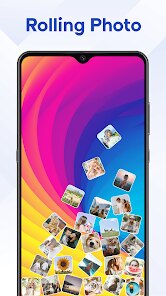
- 🌄 Customizable 3D Backgrounds: Beyond the icons, you can select from a variety of beautifully rendered 3D environments as your wallpaper. These range from serene landscapes to abstract geometric patterns, all designed with depth to complement the rolling icons and enhance the overall three-dimensional illusion.
- ⚙️ Adjustable Physics Settings: You have fine-grained control over how your icons behave. Sliders let you tweak gravity strength, friction, bounce elasticity, and overall sensitivity. This allows you to create anything from a gentle, slow-rolling field to a chaotic, bouncy pinball machine on your home screen.
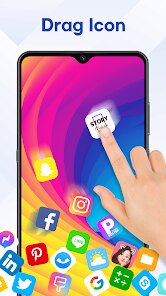
- 👆 Interactive Touch Reactions: Tapping or long-pressing icons triggers satisfying physical reactions. A tap might make an icon jump, while a press-and-hold could make it wobble or spin, adding an extra layer of tactile feedback to your interactions that feels both responsive and playful.
- 🎨 Icon Size & Spacing Control: The app lets you adjust the scale of your icons and the space between them on the virtual surface. This ensures the rolling effect doesn't make icons too hard to find or tap, allowing you to balance aesthetics with practical usability.
- 🔋 Optimized Performance Mode: A dedicated battery-saver or performance mode ensures the live wallpaper runs smoothly without excessively draining your battery. It intelligently manages the physics calculations and graphical effects when the screen is on but idle.
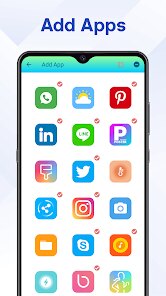
- 🔄 Automatic Icon Detection: The software automatically detects and applies the rolling effect to all your standard app icons without needing manual selection. It seamlessly integrates with your existing app layout, making setup a quick, one-tap process.
- 📁 Multiple Scene Presets: For users who want instant gratification, the app offers several curated scene presets. These are pre-configured combinations of background themes and physics settings that deliver a specific look and feel, from 'Calm Meadow' to 'Cosmic Chaos'.
- 🖼️ Static Wallpaper Fallback: If you need a break from the motion or are concerned about battery in certain situations, you can easily switch the live wallpaper to a static snapshot of your current 3D scene. This provides visual consistency while pausing the physics simulation.
- 🔧 Regular Updates & New Content: The developers consistently add fresh backgrounds, new physical behaviors, and quality-of-life improvements through updates. This commitment keeps the experience feeling new and addresses any compatibility issues with new Android versions.
pros
- ✨ Immersive and Novel Experience: The core interactive concept is incredibly fresh and engaging. It transforms routine phone navigation into something fun and visually stimulating, making your device feel uniquely personal and high-tech.
- 🛠️ Easy Setup and Integration: You don't need to install a new launcher or radically change your phone's setup. Applying the live wallpaper is as simple as setting any other wallpaper, and it immediately works with your current app icons and layout.
- 📈 Surprisingly Light on Resources: Despite the complex-looking 3D physics, the app is well-optimized. It runs smoothly on most mid-range and flagship devices without causing noticeable lag or excessive battery drain during typical use.
- 🎛️ Great Balance of Control and Simplicity: It offers deep customization for tinkerers who want to tweak every physics parameter, while also providing beautiful, ready-to-use presets for users who just want to set it and forget it.
- 😊 Pure Fun Factor: There's an undeniable joy and whimsy in poking at your icons and watching them tumble around. It's a delightful conversation starter and adds a layer of personality to your phone that static wallpapers simply cannot match.
- 🆓 Free with Optional Support: The core functionality is completely free to use, which is fantastic for such a polished experience. This allows everyone to try it risk-free, with voluntary options to support the developers for their work.
cons
- 🔋 Potential Battery Impact in Active Use: While optimized, keeping a physics simulation running continuously as a live wallpaper will inevitably use more power than a static image. During periods of heavy, continuous screen-on time, users might notice a faster battery drop compared to a standard wallpaper.
- 📱 Occasional Compatibility Quirks: On some devices or with certain third-party launchers, the icon positioning or touch detection might occasionally behave unexpectedly. It generally works flawlessly with stock launchers, but your mileage may vary with heavily customized setups.
- 🎯 Can Hinder Ultra-Fast Navigation: If you're someone who needs to launch apps with split-second speed, the moving icons might introduce a tiny moment of hesitation as you locate and tap a specific icon, especially if you've set high physics sensitivity.
- 🔄 Limited to Home Screen (Usually): On many Android versions, live wallpapers only apply to the home screen and not the lock screen or app drawer. This means the rolling effect is confined to your main desktop pages, which might feel like an incomplete transformation for some users.
- 🎨 Custom Icon Packs May Not Align Perfectly: If you use non-standard icon packs from your launcher, the app's 3D model for icons might not perfectly match the custom shape or design, which can slightly break the visual immersion for perfectionists.
- 💾 Minor Learning Curve for Settings: The array of physics sliders, while powerful, might be slightly overwhelming for a user who just wants a simple animated wallpaper. It takes a few minutes of experimentation to understand what each setting does.
Articles
![]()
How to Get Robux Safely Without Scams
![]()
How to Download Older Versions of Android Apps
![]()
How to Download Games on Google Play for the First Time
![]()
What Is an APK File for Android? Everything You Need to Know
![]()
Do Free Robux Generators Work?
![]()
Robux Pricing Guide (2026 Update): How Much Robux Really Costs
![]()
How to Avoid Scams in Roblox
![]()
Rarest Pets in Adopt Me! (2026 Update)
![]()
How to Trade Safely in Adopt Me! (So You Don't Lose Everything)
![]()
Secret Tricks Nobody Tells You in 'Steal a Brainrot'
![]()
Beginner Guide: Don't Lose Your Brainrot
![]()
How to Steal in 'Steal a Brainrot' Without Getting Caught (Or at Least Not Instantly)
![]()
Is Brookhaven RP Worth Playing? It Depends on What You’re Looking For
![]()
Why Blox Fruits Is So Popular? Here’s Why Everyone Keeps Playing It
![]()
Best Roblox Obby Games for Beginners (2026): Learn the Game Without Hitting a Wall
![]()
Top 10 Roblox Horror Games (2026): The Scariest Experiences You Can't Miss
















Hot Apps
-
![]()
Bolt: Request a Ride
Bolt Technology4.8

-
![]()
Wise: International Transfers
Wise Payments Ltd.4.7 -
![]()
Zoom - One Platform to Connect
zoom.us4.1 -
![]()
ChatGPT
OpenAI4.7 -
![]()
ChatBot - AI Chat
X PhotoKit4.5 -
![]()
PayByPhone
PayByPhone Technologies Inc .4.9 -
![]()
MyFitnessPal: Calorie Counter
MyFitnessPal, Inc.4.3 -
![]()
Instagram
Instagram4.3 -
![]()
Facebook
Meta Platforms, Inc.4 -
![]()
Ford™
Ford Motor Co.4.7 -
![]()
Uber - Request a ride
Uber Technologies, Inc.4.6 -
![]()
Venmo
PayPal, Inc.4.2 -
![]()
GroupMe
GroupMe4.5 -
![]()
Telegram
Telegram FZ-LLC4.2 -
![]()
Google Chrome: Fast & Secure
Google LLC4.1 -
![]()
SiriusXM: Music, Sports & News
SiriusXM4.6 -
![]()
Yuka - Food & cosmetic scan
Yuka App4.7 -
![]()
Netflix
Netflix, Inc.3.9 -
![]()
Snapmint: Buy Now, Pay in EMIs
Snapmint4.5 -
![]()
FaceApp: Perfect Face Editor
FaceApp Technology Ltd4.4 -
![]()
Google Pay
Google LLC4.4 -
![]()
Chai: Chat AI Platform
Chai Research Corp.4.4 -
![]()
Domino's Pizza USA
Domino's Pizza LLC4.7 -
![]()
Perplexity - Ask Anything
PerplexityAI4.7 -
![]()
Cash App
Block, Inc.4.5 -
![]()
Spotify: Music and Podcasts
Spotify AB4.3 -
![]()
Microsoft Teams
Microsoft Corporation4.6 -
![]()
ParkMobile: Park. Pay. Go.
Parkmobile, LLC4.3 -
![]()
TikTok
TikTok Pte. Ltd.4.4 -
![]()
Waze Navigation & Live Traffic
Waze3.9






























Disclaimer
1.Appinfocenter does not represent any developer, nor is it the developer of any App or game.
2.Appinfocenter provide custom reviews of Apps written by our own reviewers, and detailed information of these Apps, such as developer contacts, ratings and screenshots.
3. All trademarks, registered trademarks, brand names and company names or logos appearing on the site are the property of their respective owners.
4.Appinfocenter abides by the federal Digital Millennium Copyright Act (DMCA) by responding to notices of alleged infringement that complies with the DMCA and other applicable laws.
5.If you are the owner or copyright representative and want to delete your information, please contact us [email protected].
6.All the information on this website is strictly observed all the terms and conditions of Google Ads Advertising policies and Google Unwanted Software policy.
7.Appinfocenter.com is an independent, information-only website which is 100% free to all the users.