Easy Clean Pro

5M+
Installs
Limtech Developers
Developer
-
Productivity
Category
-
Everyone
Content Rating
-
https://sites.google.com/view/ecpprivacy
Privacy Policy
editor reviews
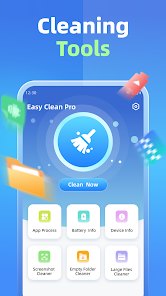
Easy Clean Pro is a straightforward utility app that helps you keep your phone tidy. It bundles junk file removal, memory boosting, and battery monitoring into one lightweight package. What stands out right away is how quickly it opens and how little it asks of you. There is no long onboarding flow, no forced tutorial; you launch it, see what is taking up space, and clear it. The interface is bright and uncluttered, with large buttons that make sense at a glance. 🧹⚡📱🚀💡🔋✨🧼📲👍📥
The app has evolved steadily since Limtech Developers first released it. Early builds focused almost entirely on cache cleaning, but later updates added a memory optimizer, a battery health readout, and a notification cleaner. That growth feels deliberate rather than bloated, and each module now works well on its own. Using it day to day is refreshingly frictionless: a quick scan takes a few seconds, results are shown in plain language, and one tap handles the rest. It never nags you with pop-ups or long ads between actions. 📈🛠️🔄🧠🔋🧽📊🎯🕹️👌
Plenty of cleaner apps exist, yet Easy Clean Pro earns its place by staying honest about what it does. It does not promise impossible speed boosts or bury everything behind a paywall. The free tier covers the essentials, the premium price is reasonable, and the app respects your privacy by keeping scans local. If your phone feels sluggish and cluttered, give it a try and see the difference for yourself. Download Easy Clean Pro today and take the first step toward a cleaner, faster device. 💎🛡️🙌📥🎉🌟✅🧡📱💫🏁
features
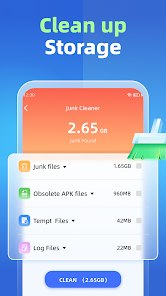
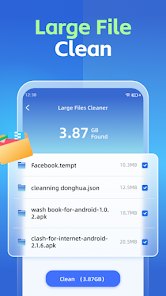
- 🧹 Junk file sweeper: The main screen scans for leftover cache files, obsolete APKs, and temporary downloads, then groups them by size so you can decide what to remove. Deletion is permanent, so the app shows a confirmation prompt before anything is cleared.
- ⚡ Memory booster: One tap frees up RAM by closing background processes that are quietly eating resources. A live meter shows current memory usage, and the boost usually recovers a noticeable chunk on older devices.
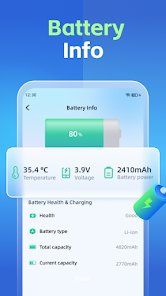
- 🔋 Battery monitor: This module tracks charging habits, temperature, and estimated health. It flags unusually high drain and suggests simple fixes, like lowering screen brightness or disabling a background app.
- 🔔 Notification cleaner: It collects piled-up notifications and lets you dismiss them in bulk. Handy after a long day when your shade is full of promotions and reminders you no longer need.
- 📊 Storage breakdown: A colorful chart splits your storage into categories such as photos, apps, and documents, making it easy to spot what is really hogging space.
pros
- 🚀 Fast and light: The app opens in under two seconds and barely touches your battery while running in the background. Scans finish quickly even on budget phones.
- 🎨 Clean design: Large buttons, clear labels, and a simple color scheme make every screen easy to understand. Nothing is hidden behind confusing menus.
- 🛡️ Privacy-friendly: All scanning happens on your device, and the app does not request unnecessary permissions. That is a relief compared with rivals that want access to everything.
- 💰 Fair pricing: The free version handles basic cleaning without constant interruptions, and the premium upgrade is a one-time cost rather than a subscription.
cons
- 📢 Occasional ads: The free tier shows banner ads at the bottom of the screen. They are not intrusive, but they do take up space on smaller displays.
- 🔍 Limited deep cleaning: The app skips some advanced areas, such as duplicate photo detection and large-file analysis, which dedicated cleaner apps offer.
- 🕰️ No scheduling: You cannot set automatic weekly cleanups, so you have to remember to run scans yourself. A reminder option would be a welcome addition.
- 📉 Basic battery data: The battery section shows health estimates but lacks detailed history charts, so tracking long-term trends is difficult.
Articles
![]()
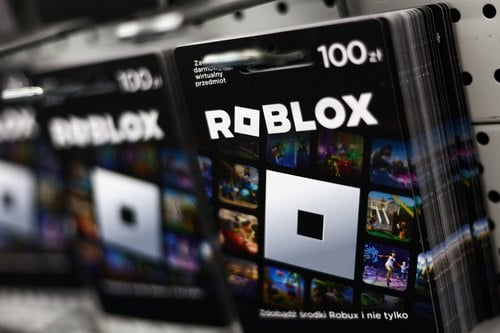
How to Get Robux Safely Without Scams
![]()
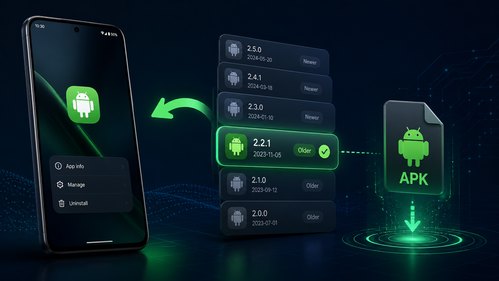
How to Download Older Versions of Android Apps
![]()
How to Download Games on Google Play for the First Time
![]()
What Is an APK File for Android? Everything You Need to Know
![]()
Do Free Robux Generators Work?
![]()
Robux Pricing Guide (2026 Update): How Much Robux Really Costs
![]()
How to Avoid Scams in Roblox
![]()
Rarest Pets in Adopt Me! (2026 Update)
![]()
How to Trade Safely in Adopt Me! (So You Don't Lose Everything)
![]()
Secret Tricks Nobody Tells You in 'Steal a Brainrot'
![]()
Beginner Guide: Don't Lose Your Brainrot
![]()
How to Steal in 'Steal a Brainrot' Without Getting Caught (Or at Least Not Instantly)
![]()
Is Brookhaven RP Worth Playing? It Depends on What You’re Looking For
![]()
Why Blox Fruits Is So Popular? Here’s Why Everyone Keeps Playing It
![]()
Best Roblox Obby Games for Beginners (2026): Learn the Game Without Hitting a Wall
![]()
Top 10 Roblox Horror Games (2026): The Scariest Experiences You Can't Miss










Hot Apps
-
![]()
ParkMobile: Park. Pay. Go.
Parkmobile, LLC4.3
-
![]()
Direct Express®
i2c Inc.4.3 -
![]()
Domino's Pizza USA
Domino's Pizza LLC4.7
-
![]()
Google Chat
Google LLC4.4 -
![]()
Pinterest
Pinterest4.5 -
![]()
Amazon Alexa
Amazon Mobile LLC4.5 -
![]()
PayByPhone
PayByPhone Technologies Inc .4.9 -
![]()
CapCut - Video Editor
Bytedance Pte. Ltd.4 -
![]()
MyFitnessPal: Calorie Counter
MyFitnessPal, Inc.4.3 -
![]()
OfferUp: Buy. Sell. Letgo.
OfferUp Inc.4.4 -
![]()
Pandora - Music & Podcasts
Pandora4.1 -
![]()
Bolt: Request a Ride
Bolt Technology4.8 -
![]()
TikTok
TikTok Pte. Ltd.4.4 -
![]()
Microsoft Teams
Microsoft Corporation4.6 -
![]()
Geeni
Merkury Innovations4.6 -
![]()
Sora by OpenAI
OpenAI4.7 -
![]()
DoorDash - Food Delivery
DoorDash4.6 -
![]()
letgo: Buy & Sell Used Stuff
letgo3.3 -
![]()
WhatsApp Messenger
WhatsApp LLC4.2 -
![]()
TikTok
TikTok Pte. Ltd.4.4 -
![]()
Snapmint: Buy Now, Pay in EMIs
Snapmint4.5 -
![]()
Blink Home Monitor
Immedia Semiconductor4 -
![]()
Google Home
Google LLC4.2 -
![]()
ChatGPT
OpenAI4.7 -
![]()
ChatBot - AI Chat
X PhotoKit4.5 -
![]()
GasBuddy: Find & Pay for Gas
PDI Software, Inc.3.1 -
![]()
FaceApp: Perfect Face Editor
FaceApp Technology Ltd4.4 -
![]()
YouTube
Google LLC4.1 -
![]()
Klarna | Shop now. Pay later.
Klarna Bank AB (publ)4.3 -
![]()
Microsoft Copilot
Microsoft Corporation4.8





























Disclaimer
1.Appinfocenter does not represent any developer, nor is it the developer of any App or game.
2.Appinfocenter provide custom reviews of Apps written by our own reviewers, and detailed information of these Apps, such as developer contacts, ratings and screenshots.
3. All trademarks, registered trademarks, brand names and company names or logos appearing on the site are the property of their respective owners.
4.Appinfocenter abides by the federal Digital Millennium Copyright Act (DMCA) by responding to notices of alleged infringement that complies with the DMCA and other applicable laws.
5.If you are the owner or copyright representative and want to delete your information, please contact us [email protected].
6.All the information on this website is strictly observed all the terms and conditions of Google Ads Advertising policies and Google Unwanted Software policy.
7.Appinfocenter.com is an independent, information-only website which is 100% free to all the users.