GPS Maps Voice Navigation

1M+
Installs
Green Lines
Developer
-
Productivity
Category
-
Everyone
Content Rating
-
https://sites.google.com/view/gpsnavigationmapdirection/home
Privacy Policy
editor reviews
Navigating the world has never been more intuitive than with GPS Maps Voice Navigation by Green Lines. This app stands out in the crowded field of digital mapping by offering a refreshingly straightforward and reliable experience. From the moment you launch it, you're greeted with a clean, uncluttered interface that prioritizes functionality over flashy graphics. The development philosophy seems centered on delivering core navigation features without unnecessary bloat, making it a lightweight yet powerful tool for daily commutes, road trips, and exploring new cities. Its usage feels smooth and responsive, with map tiles loading quickly and route calculations happening in near real-time, which is a testament to its efficient backend engineering.
The choice to use this particular software among a sea of alternatives often comes down to its admirable balance. It doesn't try to be a social platform or a local business review hub; it focuses on being an excellent navigator. For users tired of apps crammed with ads, promoted locations, and complex menus, Green Lines offers a sanctuary of simplicity. The voice guidance is clear and timely, providing ample warning for upcoming turns without being overly verbose. My personal experience during a long drive through rural areas was impressive; the app maintained a strong GPS lock and offered sensible rerouting options when I deliberately strayed from the suggested path, all while consuming minimal battery life.
Ultimately, GPS Maps Voice Navigation carves its niche by perfecting the fundamentals. It provides accurate directions, dependable offline capabilities, and a stress-free user interface that gets you from point A to point B without fuss. In a digital landscape where apps constantly demand attention with notifications and updates, this one quietly does its job with remarkable competence. If you value a no-nonsense, efficient, and reliable companion for all your journeys, look no further. Ditch the complicated apps and experience navigation as it should be. Download GPS Maps Voice Navigation today and transform your travel experience! 🗺️🚗🎯📱✅🌟👏👍🗣️🔄
features
- 🗣️ Crystal-Clear Voice Guidance: The app provides natural, audible turn-by-turn instructions. The voice is easy to understand, even over car noise, and gives perfectly timed prompts like "turn right in 500 feet," eliminating the need to constantly glance at the screen.
- 📡 Robust Offline Mapping: You can download detailed maps for entire countries or regions. This feature is a lifesaver in areas with poor or no cellular service, ensuring you're never left stranded without directions during critical moments of your trip.
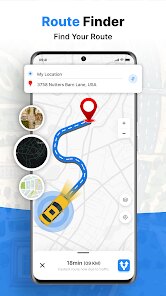
- ⚡ Lightning-Fast Route Calculation: The routing engine is exceptionally quick. Whether you're calculating a cross-country journey or finding a detour around sudden traffic, the app delivers multiple route options (fastest, shortest) almost instantly.
- 🚦 Real-Time Traffic Alerts: Stay ahead of congestion with integrated live traffic data. The app visually highlights slow-moving roads in red or orange and can automatically suggest faster alternative routes to save you valuable time and frustration.
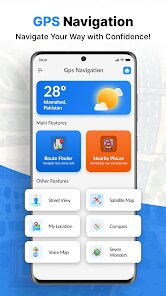
- 🎨 Streamlined, User-Friendly Interface: The design is minimalist and intuitive. All essential controls—search, start navigation, access offline maps—are within easy reach, making the app usable for drivers of all tech-savviness levels without a steep learning curve.
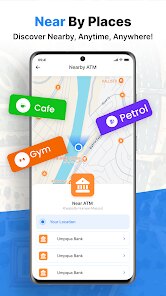
- 📍 Accurate Point-of-Interest Search: Finding gas stations, restaurants, or hotels is a breeze. The search function pulls up relevant, up-to-date listings quickly, and you can navigate to any result with a single tap, seamlessly integrating search and routing.
- 🔋 Exceptional Battery Efficiency: Unlike some navigation apps that drain your phone quickly, this one is optimized to conserve power. It uses GPS and data efficiently, allowing for hours of navigation without needing a constant connection to a car charger.
- 🔄 Reliable Rerouting Logic: If you miss a turn or decide to take a different road, the app recalculates your new route smoothly and without panic. The new directions are provided promptly, getting you back on track with minimal disruption.
- 🌙 Comfortable Night Mode: The screen automatically switches to a dark color scheme after sunset. This reduces glare and eye strain during nighttime driving, creating a much safer and more pleasant viewing experience.
- 📤 One-Tap Location Sharing: Need to let someone know your ETA? With a simple tap, you can generate a link to your live trip or destination and share it via messaging apps, providing peace of mind to friends and family.
pros
- 🌟 Remarkably Lightweight and Fast: The app installs quickly and doesn't hog storage space or memory. This leanness translates directly into snappy performance, with no lag when zooming or panning the map, even on older devices.
- 👍 Uncluttered, Ad-Lite Experience: The focus remains squarely on navigation. While there may be minimal ads, they are non-intrusive and never pop up during active navigation, allowing you to concentrate fully on the road ahead.
- ✅ Outstanding Offline Reliability: The offline functionality isn't an afterthought; it's a core, fully-featured strength. Navigated routes, searches, and voice guidance all work flawlessly without an internet connection, which is incredibly dependable.
- 🗣️ Customizable Voice Prompts: You can adjust the volume of voice guidance independently of your media volume and choose from different instruction styles (e.g., earlier warnings). This level of control lets you tailor the auditory experience to your preference.
- 🔍 Search That Actually Works: The POI database is comprehensive and accurate. It reliably finds places other apps sometimes miss, especially useful for locating specific small businesses or addresses in suburban or rural locales.
- 📱 Consistent Stability: The app is rock-solid. It rarely, if ever, crashes or freezes, even during long, complex navigation sessions. This reliability builds tremendous trust, as you know the app won't fail you when you need it most.
cons
- ⚠️ Limited Advanced Features: The app lacks some bells and whistles found in competitors, such as lane guidance with detailed junction views, speed limit displays on the map, or integration with calendar events for automatic destination setting.
- ⚠️ Sparse Community Updates: While the core map data is solid, the system for user-reported updates on road closures, accidents, or police traps seems less active or integrated than in some crowd-sourced platforms, potentially missing real-time hazards.
- ⚠️ Basic Map Aesthetics: The visual design of the maps is functional but somewhat plain. The color schemes and icons lack the polish and visual depth of top-tier apps, which might be a minor downside for users who prefer highly stylized maps.
- ⚠️ Occasional Address Ambiguity: In very rare cases, especially with new housing developments, the app might not recognize a specific street address and will navigate you to a nearby pin on the map instead, requiring a final bit of manual searching.
- ⚠️ Infrequent Interface Quirks: Some menu labels or settings could be slightly clearer. For instance, the process for managing multiple downloaded offline maps might take a moment to figure out on the first attempt.
- ⚠️ Modest Brand Recognition: Being from a developer called 'Green Lines null,' it doesn't carry the instant brand trust of a Google or Apple. Some users might initially question its data quality, though its performance quickly dispels such doubts.
Articles
![]()
How to Get Robux Safely Without Scams
![]()
How to Download Older Versions of Android Apps
![]()
How to Download Games on Google Play for the First Time
![]()
What Is an APK File for Android? Everything You Need to Know
![]()
Do Free Robux Generators Work?
![]()
Robux Pricing Guide (2026 Update): How Much Robux Really Costs
![]()
How to Avoid Scams in Roblox
![]()
Rarest Pets in Adopt Me! (2026 Update)
![]()
How to Trade Safely in Adopt Me! (So You Don't Lose Everything)
![]()
Secret Tricks Nobody Tells You in 'Steal a Brainrot'
![]()
Beginner Guide: Don't Lose Your Brainrot
![]()
How to Steal in 'Steal a Brainrot' Without Getting Caught (Or at Least Not Instantly)
![]()
Is Brookhaven RP Worth Playing? It Depends on What You’re Looking For
![]()
Why Blox Fruits Is So Popular? Here’s Why Everyone Keeps Playing It
![]()
Best Roblox Obby Games for Beginners (2026): Learn the Game Without Hitting a Wall
![]()
Top 10 Roblox Horror Games (2026): The Scariest Experiences You Can't Miss
















Hot Apps
-
![]()
Passport Parking
Passport Labs, Inc.2.5

-
![]()
Uber Eats: Food Delivery
Uber Technologies, Inc.4.3 -
![]()
Blink Home Monitor
Immedia Semiconductor4 -
![]()
Telegram
Telegram FZ-LLC4.2 -
![]()
Hulu: Stream TV shows & movies
Disney4.5 -
![]()
DeepSeek - AI Assistant
DeepSeek4.2 -
![]()
Signal Private Messenger
Signal Foundation4.5 -
![]()
Klarna | Shop now. Pay later.
Klarna Bank AB (publ)4.3 -
![]()
TikTok
TikTok Pte. Ltd.4.4 -
![]()
Yuka - Food & cosmetic scan
Yuka App4.7 -
![]()
Google Chrome: Fast & Secure
Google LLC4.1 -
![]()
Afterpay - Buy Now Pay Later
Afterpay3.8 -
![]()
Google Maps
Google LLC4.2 -
![]()
Sora by OpenAI
OpenAI4.7 -
![]()
Geeni
Merkury Innovations4.6 -
![]()
Venmo
PayPal, Inc.4.2 -
![]()
Zoom - One Platform to Connect
zoom.us4.1 -
![]()
PayByPhone
PayByPhone Technologies Inc .4.9 -
![]()
ChatOn - AI Chat Bot Assistant
AIBY Inc.4.4 -
![]()
Grok
xAI4.9 -
![]()
Direct Express®
i2c Inc.4.3 -
![]()
Domino's Pizza USA
Domino's Pizza LLC4.7 -
![]()
Uber - Request a ride
Uber Technologies, Inc.4.6 -
![]()
SiriusXM: Music, Sports & News
SiriusXM4.6 -
![]()
ParkMobile: Park. Pay. Go.
Parkmobile, LLC4.3 -
![]()
Waze Navigation & Live Traffic
Waze3.9 -
![]()
Affirm: Buy now, pay over time
Affirm, Inc4.7 -
![]()
Chai: Chat AI Platform
Chai Research Corp.4.4 -
![]()
Cash App
Block, Inc.4.5 -
![]()
Facebook
Meta Platforms, Inc.4






























Disclaimer
1.Appinfocenter does not represent any developer, nor is it the developer of any App or game.
2.Appinfocenter provide custom reviews of Apps written by our own reviewers, and detailed information of these Apps, such as developer contacts, ratings and screenshots.
3. All trademarks, registered trademarks, brand names and company names or logos appearing on the site are the property of their respective owners.
4.Appinfocenter abides by the federal Digital Millennium Copyright Act (DMCA) by responding to notices of alleged infringement that complies with the DMCA and other applicable laws.
5.If you are the owner or copyright representative and want to delete your information, please contact us [email protected].
6.All the information on this website is strictly observed all the terms and conditions of Google Ads Advertising policies and Google Unwanted Software policy.
7.Appinfocenter.com is an independent, information-only website which is 100% free to all the users.